According to Baymard Institute’s extensive research analyzing cart abandonment, roughly 70% of shoppers who add items to their cart never complete the purchase. The causes are familiar: unexpected costs, forced account creation, complicated forms, slow shipping options. But one often-overlooked factor is navigation itself — the way a store’s menu, header, and links behave during the checkout process.
When a shopper is ready to buy, every link away from the checkout page is a potential exit. Most of those exits are not malicious — the shopper isn’t trying to leave, they just got distracted or second-guessed themselves. The store’s navigation structure either helps them stay focused or gives them an easy path out.
This is not about hiding the exit — shoppers should always be able to leave if they want to. It is about not inviting them to leave by accident. During checkout, navigation becomes less about discovery and more about not breaking the flow.
- 70% of shoppers abandon their cart — navigation friction is often an invisible contributor.
- Full header menus during checkout invite distraction; minimal headers keep focus on completing the purchase.
- On mobile, where checkout is harder, thumb-friendly navigation and persistent cart access matter even more.
The full header menu during checkout is a distraction
Most ecommerce stores use the same header on every page: logo on the left, navigation menu in the middle, search and cart icons on the right. This header works well for browsing — it helps shoppers jump between categories, search for products, and access their cart. But during checkout, that same header becomes a problem.
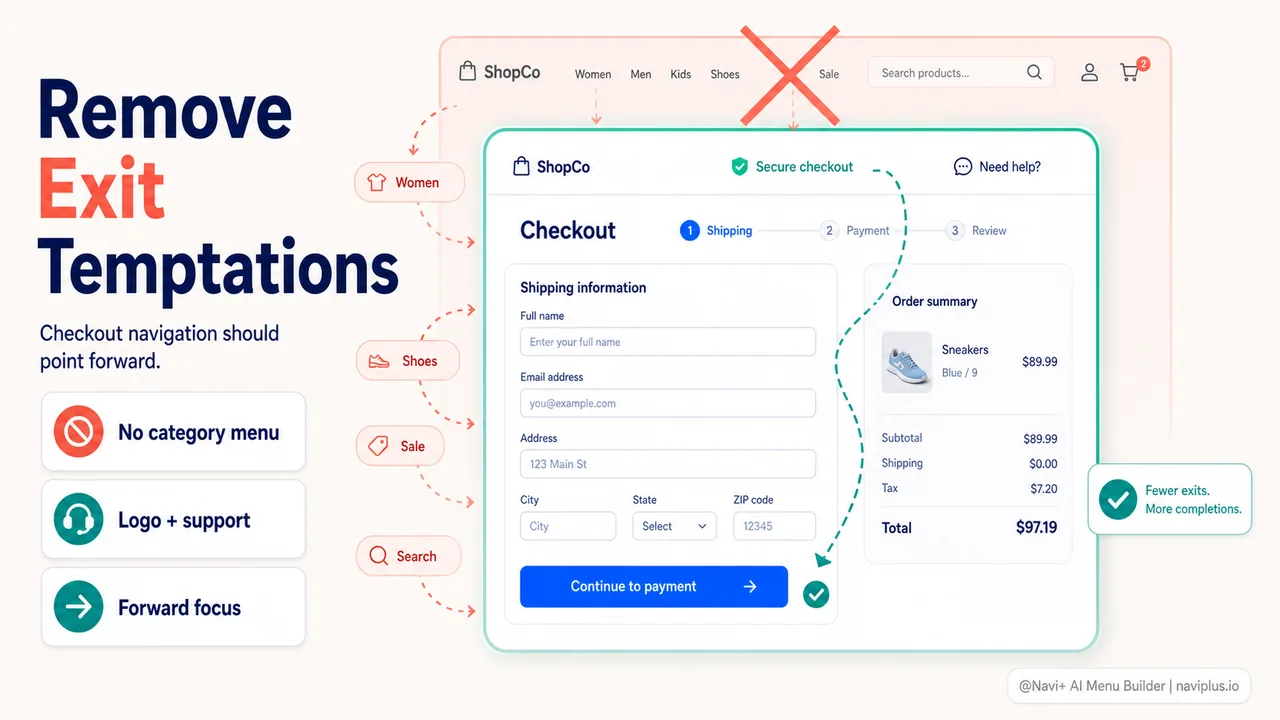
The issue is not the header itself, but the invitation to leave. If the shopper is on the checkout page filling out their shipping address, and the full navigation menu is still visible in the header, they are one click away from browsing dresses, reading the blog, or checking the about page. Each of these links is a potential exit from the checkout flow.
Baymard Institute’s checkout usability research shows that simplifying the header during checkout reduces these unintentional exits. Many high-performing stores switch to a minimal checkout header — just the logo (often linked to cart, not homepage) and perhaps a phone number or chat link for support. No category menu. No search bar. No secondary links to policies or blogs.
The logic is straightforward: if the shopper is in the checkout flow, the store’s goal is to help them complete the purchase, not to help them browse more. Browsing is valuable earlier in the journey, but once someone is filling in their payment information, browsing is a distraction.
Deep-diveRead the full guide → Checkout header patterns: when to hide the menu
Mobile checkout: where navigation mistakes multiply
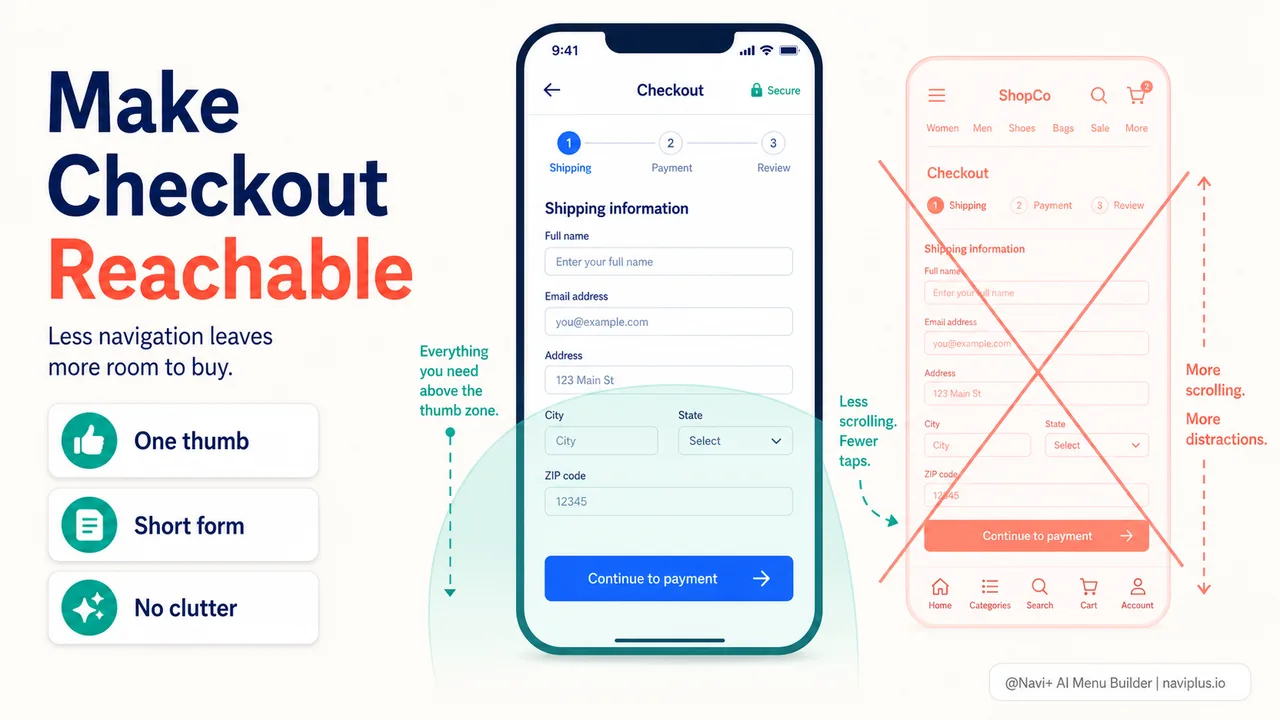
On mobile, checkout friction is amplified. The screen is small, typing is slow, and the thumb reaches only the lower half of the screen comfortably. Yet many stores treat mobile checkout as a shrunken version of desktop checkout, with all the same navigation elements crammed into a narrow viewport.
Nielsen Norman Group’s research on mobile checkout UX found that the entire flow from product to checkout should feel simple, with minimal taps and no unnecessary navigation choices. When a shopper taps the cart icon, they should land directly in the cart or at checkout — not at an intermediate page asking what they want to do next.
The persistent header problem is worse on mobile. A full navigation menu takes up valuable screen space and pushes the checkout form further down, requiring more scrolling. Each scroll is a small friction, and on mobile, these frictions add up quickly. A shopper who has to scroll through five screens of form fields is more likely to abandon than one who sees the entire checkout in two screens.
One pattern that helps: collapsing the header entirely on mobile checkout, or reducing it to a back button and a progress indicator. This frees up screen real estate and keeps the shopper’s attention on the form, not on the menu. Tools like Navi+ let you configure navigation separately for mobile versus desktop — meaning you can show a full tabbar during browsing but hide or simplify it during checkout.
Deep-diveRead the full guide → Mobile checkout navigation: one-thumb checkout flows
The cart icon: persistent access versus checkout distraction
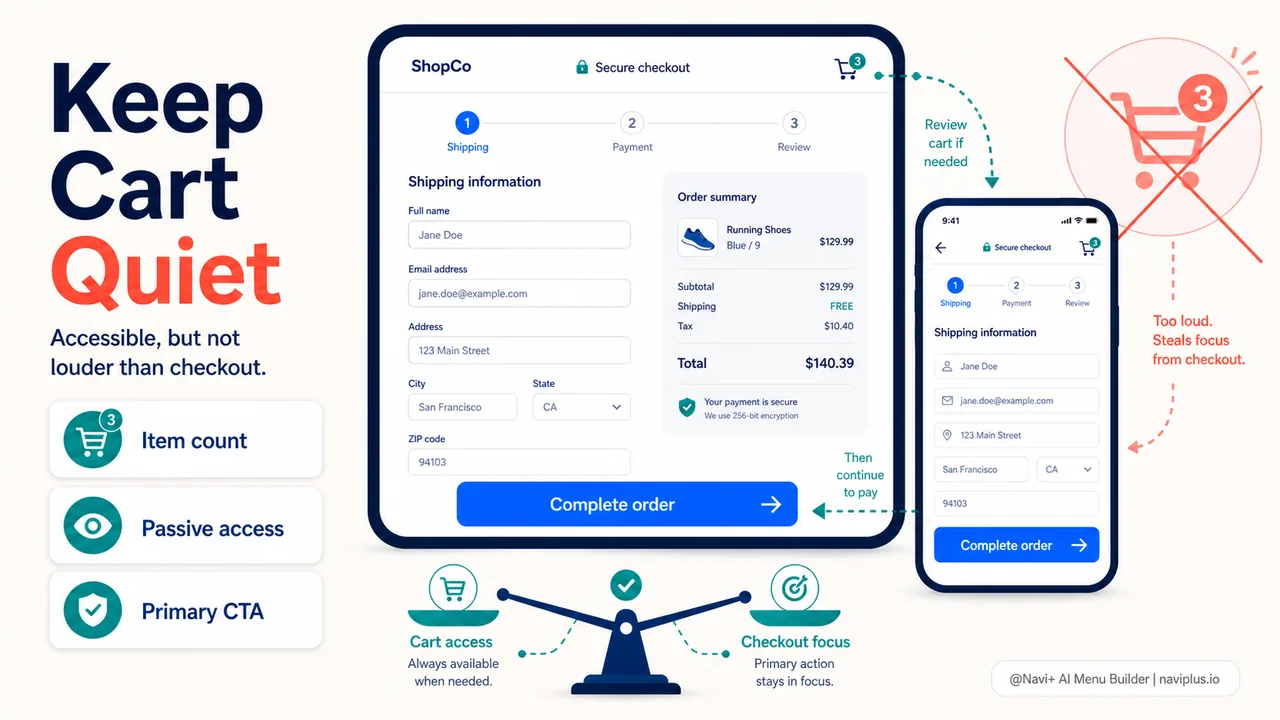
There’s a tension during checkout between two needs. One: the shopper should always be able to get back to their cart to review or edit items. Two: making the cart too prominent during checkout can encourage second-guessing.
The balance most stores strike is to keep a small cart icon in the header during checkout, but make it passive — show the item count, but don’t make it the most prominent element. The shopper knows the cart is there if they need it, but the visual hierarchy pushes them toward the “Complete order” button instead.
On mobile, this balance is trickier. A bottom tabbar with a persistent cart icon is valuable during browsing — it gives the shopper one-tap access to their cart from any page. But during checkout, that same tabbar can feel like an invitation to leave. Some stores hide the tabbar entirely on the checkout page. Others keep it but change the cart button to a disabled state, or replace it with a progress indicator.
There’s no single right answer, but the principle holds: make it easy for the shopper to get back to the cart if they need to, but don’t make it so prominent that they forget they were in the middle of checking out.
Deep-diveRead the full guide → Cart persistence and shortcuts: keeping the cart accessible
Exit-intent: catching navigation-based abandonment
Even with a clean checkout flow, some shoppers will navigate away. They click the logo, they tap the back button, they open a new tab to compare prices. These are exits, but they are not always final. The shopper might come back in a few minutes, or a few hours, or never.
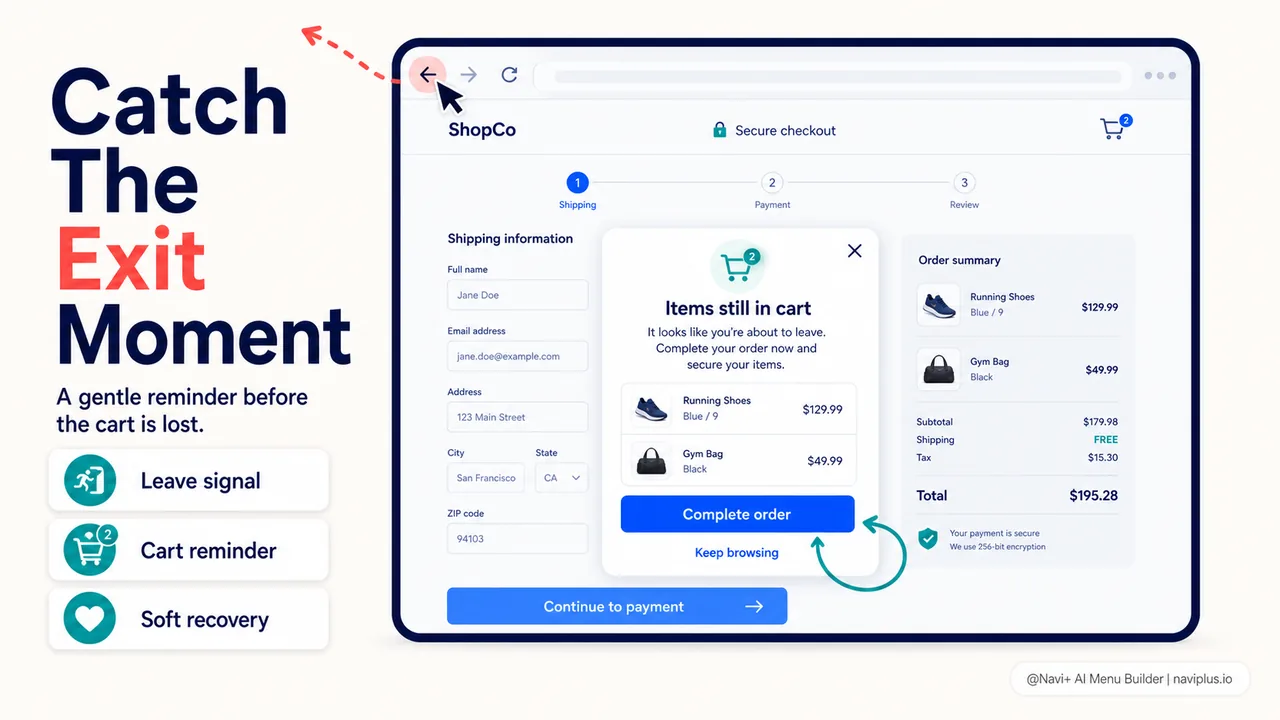
Exit-intent tools can catch some of these abandonments. When the shopper moves their cursor toward the browser’s address bar or back button — a signal that they are about to leave — a lightweight overlay can appear: “Wait — you have items in your cart. Complete your order now and get free shipping.” This is not a hard block, just a reminder. If the shopper still wants to leave, they can. But many will pause and reconsider.
Exit-intent is more effective on desktop than mobile (cursor tracking is more reliable than touch tracking), but it works in both contexts when the shopper is navigating away rather than closing the tab. It is a last-chance recovery mechanism, and it works precisely because navigation made it easy to leave in the first place.
Deep-diveRead the full guide → Exit-intent and navigation-based recovery
Where to start
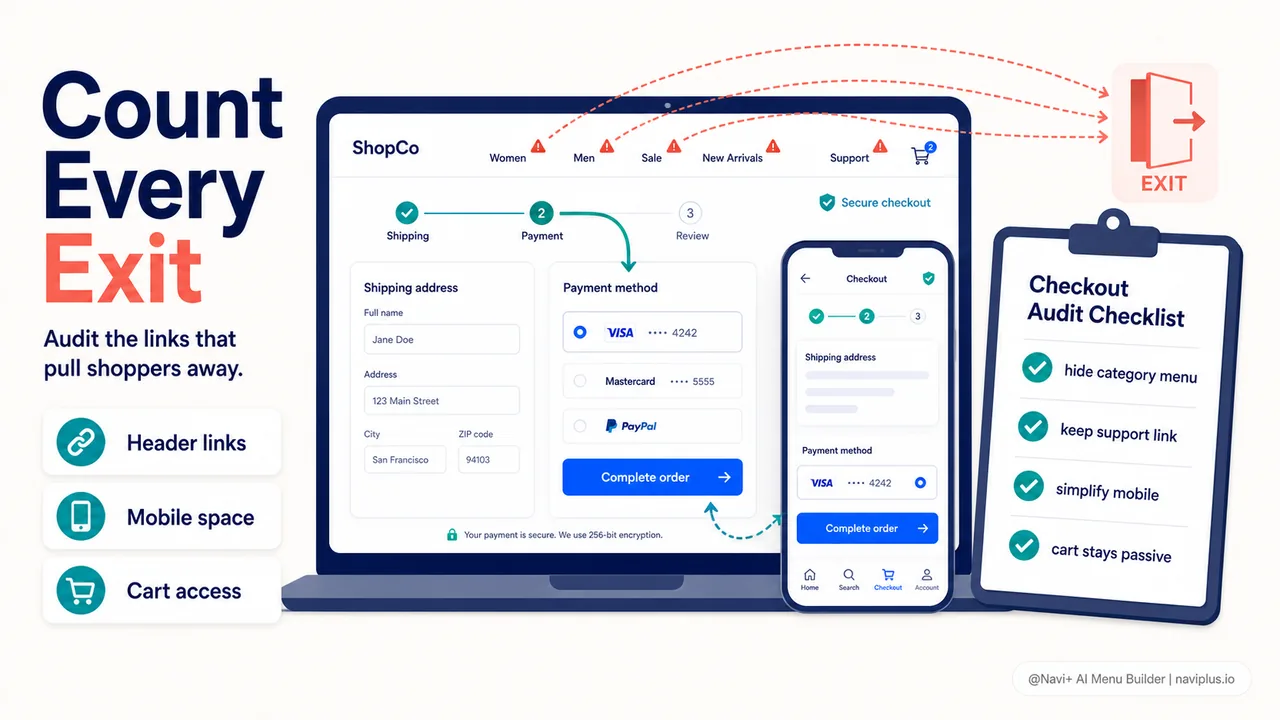
Quick auditStart a checkout on your store — on desktop and mobile — and count how many links in the header could take you away from completing the purchase. If the number is more than two (logo and support), there's room to simplify.
Open your store and go through the checkout process. Don’t complete the purchase — just observe the header, the navigation, the links. How many ways are there to leave the checkout flow? Could you accidentally click into a category menu? Is the search bar still there, inviting you to look for something else? Is the full site footer visible with dozens of secondary links?
Now do the same thing on your phone. Does the checkout feel harder? Does the navigation take up too much screen space? Do you have to scroll past the header to see the form fields?
Baymard’s research on cart abandonment shows that 22% of shoppers abandon due to a complex or lengthy checkout. Navigation is not the only source of complexity, but it is one of the easiest to fix. Simplify the header during checkout. Keep the cart accessible but not prominent. On mobile, reduce or hide navigation entirely to keep focus on the form.
Small changes here — removing a menu, hiding a search bar, collapsing a footer — won’t show up as a dramatic spike in conversions. But they remove small invitations to leave, and over time, that means more completed purchases and fewer carts sitting abandoned.
Sources:
探索更多主题
本指南链接到一系列专题文章——逐一深入了解。