A store with 500 products offers more choice than a store with 50. More choice sounds better — more options mean more chances to find the perfect product. But research shows the opposite: beyond a certain point, more choice makes decisions harder, not easier. Shoppers faced with too many options often choose nothing.
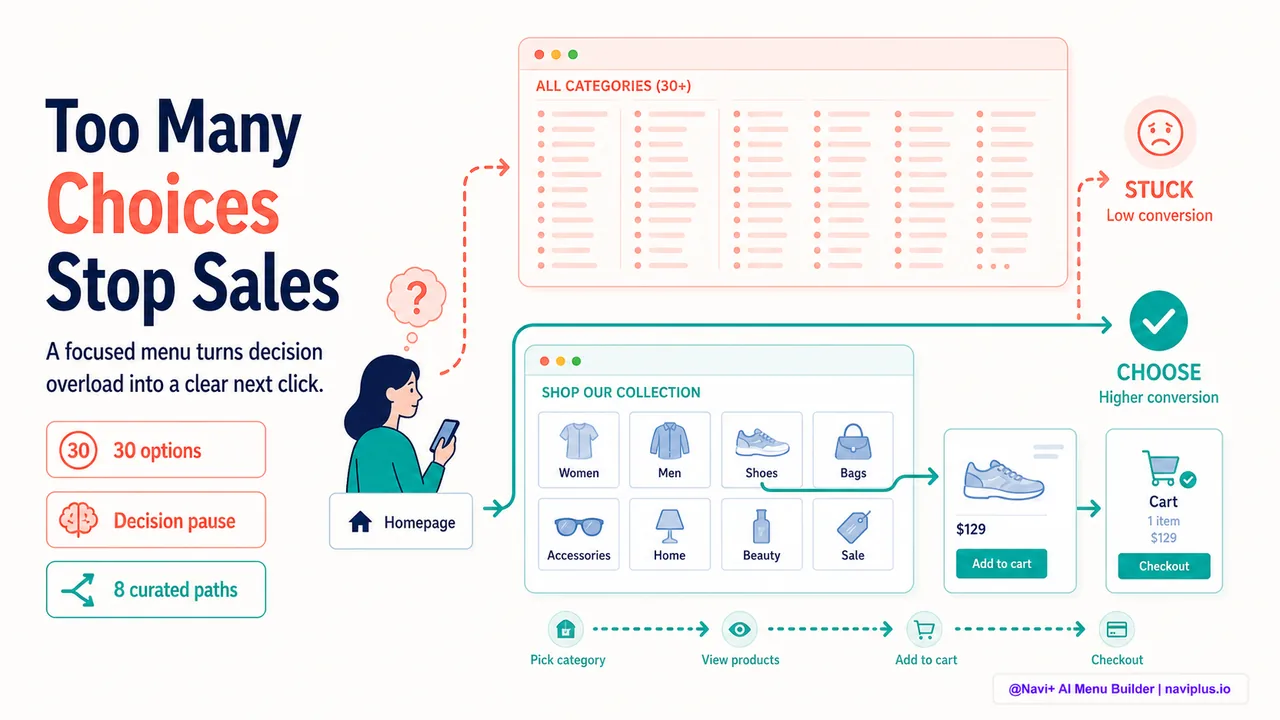
This is called the paradox of choice, and it shows up most clearly in navigation. A menu with 30 top-level categories gives the shopper more paths to explore, but it also gives them 30 decisions to make before they even start looking at products. Each decision is cognitive work. Too much work, and the shopper gives up.
Navigation that reduces decision fatigue doesn’t hide options — it structures them. It shows the shopper a manageable set of choices at each step, guides them toward relevant sections, and uses defaults to reduce the number of active decisions required.
- More menu options don't always help — beyond a threshold, they create decision paralysis instead of choice.
- Curated categories organized around shopper intent reduce the cognitive load of navigating.
- Progressive disclosure and smart defaults guide decisions without forcing them.
The research: how choice overload reduces conversions
The paradox of choice was popularized by psychologist Barry Schwartz, but the ecommerce evidence comes from controlled studies. One famous experiment involved jam samples in a grocery store. When shoppers were offered 24 flavors to sample, 60% stopped to try one, but only 3% made a purchase. When the selection was reduced to 6 flavors, 40% stopped to try — and 30% made a purchase. Fewer options, ten times the conversion rate.
The same principle applies to navigation. A collection page showing 100 products with no filters creates the same overwhelm as the 24-jam table. The shopper sees too many options, can’t easily compare them, and either picks randomly or leaves without buying.
Baymard Institute’s research on ecommerce product lists found that shoppers need structure to make decisions. Filters, sorting options, and clear product cards help, but the most effective reduction in decision fatigue comes earlier — in the menu itself. If the menu guides the shopper to a collection with 20 relevant products instead of 100 mixed products, the decision becomes manageable.
Deep-diveRead the full guide → The choice paradox: why more options reduce conversions
Curated categories: organizing around intent
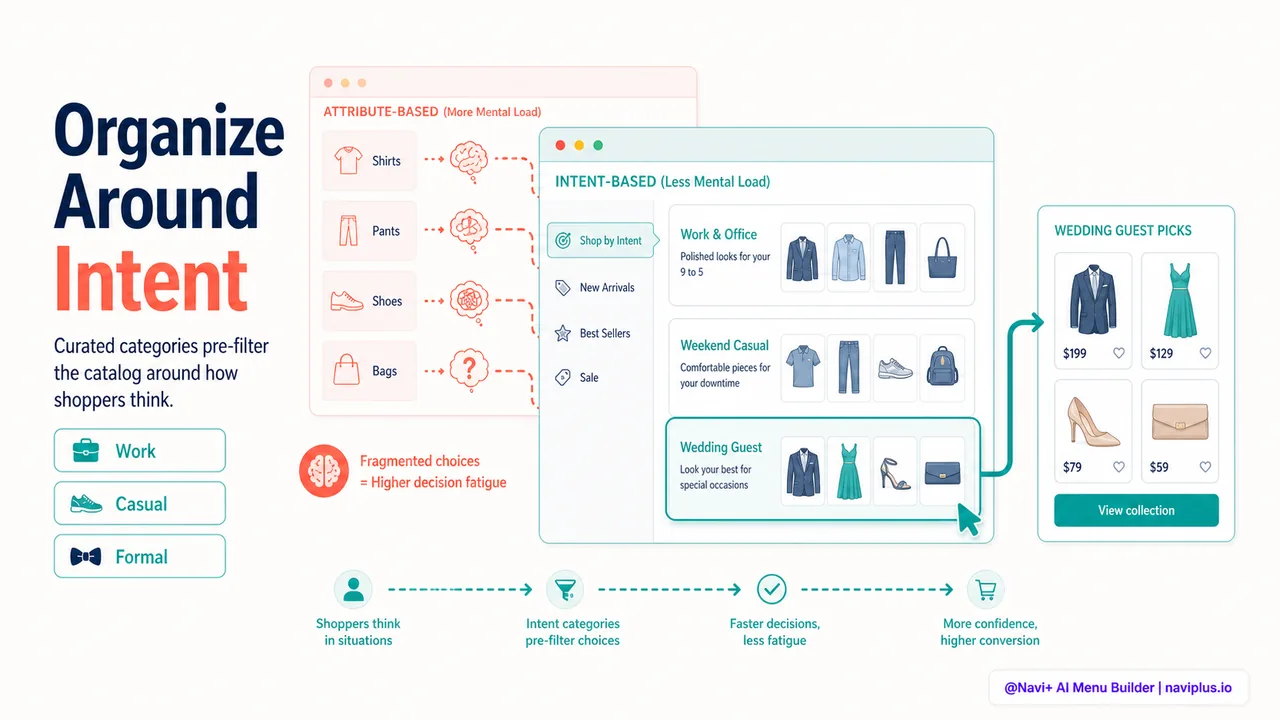
Most stores organize navigation around product attributes: Men, Women, Kids. Shirts, Pants, Dresses. This structure makes sense from an inventory perspective, but it doesn’t match how shoppers think when they arrive at a store.
A shopper looking for “something to wear to work” doesn’t think in terms of “shirts” and “pants” — they think in terms of the outcome. A curated category like “Work & Office” or “Business Casual” reduces decision fatigue because it pre-filters the catalog around the shopper’s intent. Instead of browsing Shirts, then Pants, then Shoes to assemble an outfit, the shopper browses one category that contains the relevant options from all three.
This is why many fashion stores add intent-based categories alongside attribute-based ones: Shop by Occasion (Work, Casual, Formal), Shop by Season (Summer, Winter), Shop by Activity (Running, Yoga, Hiking). These categories don’t replace the traditional structure — they supplement it. The shopper who knows they want a dress can browse Dresses. The shopper who wants “something for a wedding” can browse Formal Occasion.
The key is curation. A curated category shows a subset of products that fit a specific use case. The shopper trusts that the store has already done the filtering work, which reduces the cognitive load of evaluating each product individually.
Deep-diveRead the full guide → Curated categories: navigation that guides decisions
Progressive disclosure: one decision at a time
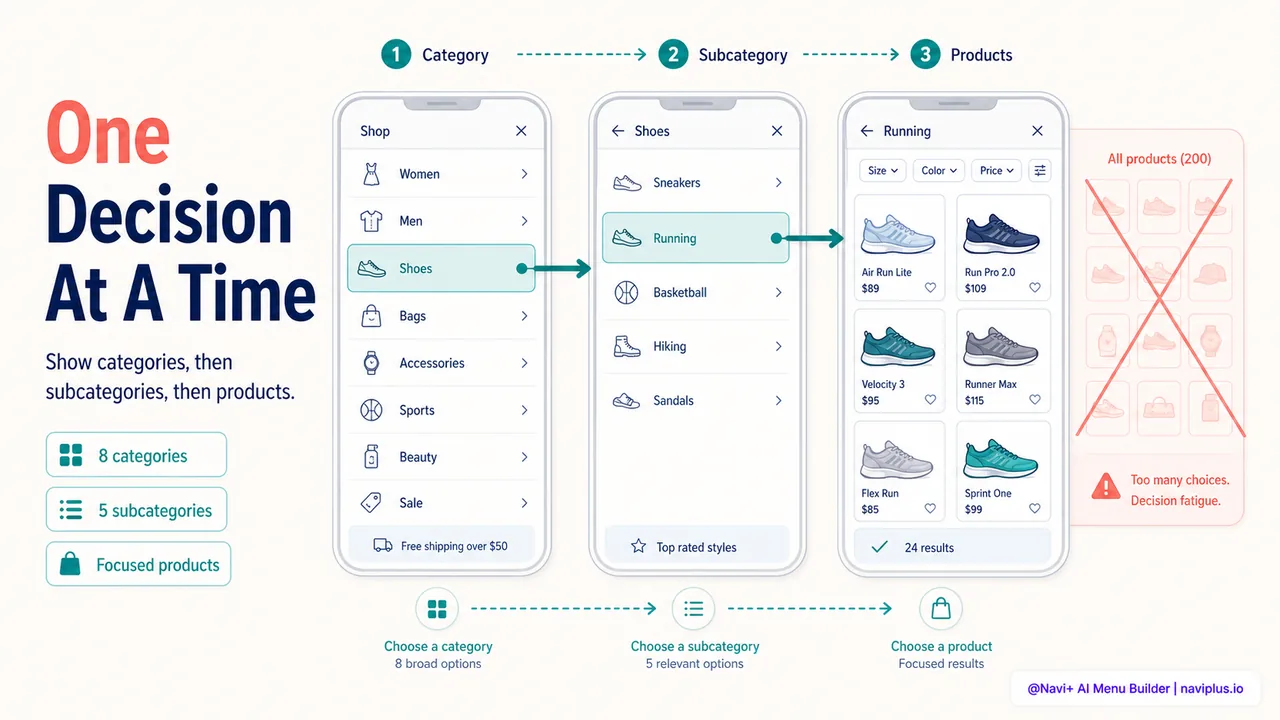
Progressive disclosure means showing the shopper a small number of options at each level, with the ability to drill down for more. Instead of showing all 200 products in a flat list, the menu shows 8 top-level categories. Tapping one reveals 5 subcategories. Tapping a subcategory shows the products.
At each step, the shopper makes one manageable decision. They don’t need to evaluate 200 products at once — they evaluate 8 categories, choose one, then evaluate 5 subcategories, choose one, then evaluate the products within that narrow scope.
This is the mental model of physical stores. A customer walks into a department store, sees signs for different departments (Men’s, Women’s, Kids), walks to one, then sees sections within that department (Shirts, Pants, Shoes), walks to one, and then browses the rack. Each decision is small and guided by visual cues.
On mobile, progressive disclosure is essential because screen space is limited. A slide menu that shows top-level categories, then slides to reveal subcategories when one is tapped, gives the shopper a clear sense of progress. They’re navigating down a tree, one branch at a time, rather than trying to see the whole tree at once.
Filters on collection pages extend progressive disclosure. The shopper starts with a broad category (Shoes), narrows by one filter (Running), narrows further by another (Size 10), and the product list shrinks with each step. Each filter is a decision, but each decision is simple — yes or no, not “which of these 200.”
Deep-diveRead the full guide → Progressive disclosure: showing options gradually
Smart defaults: guiding without forcing
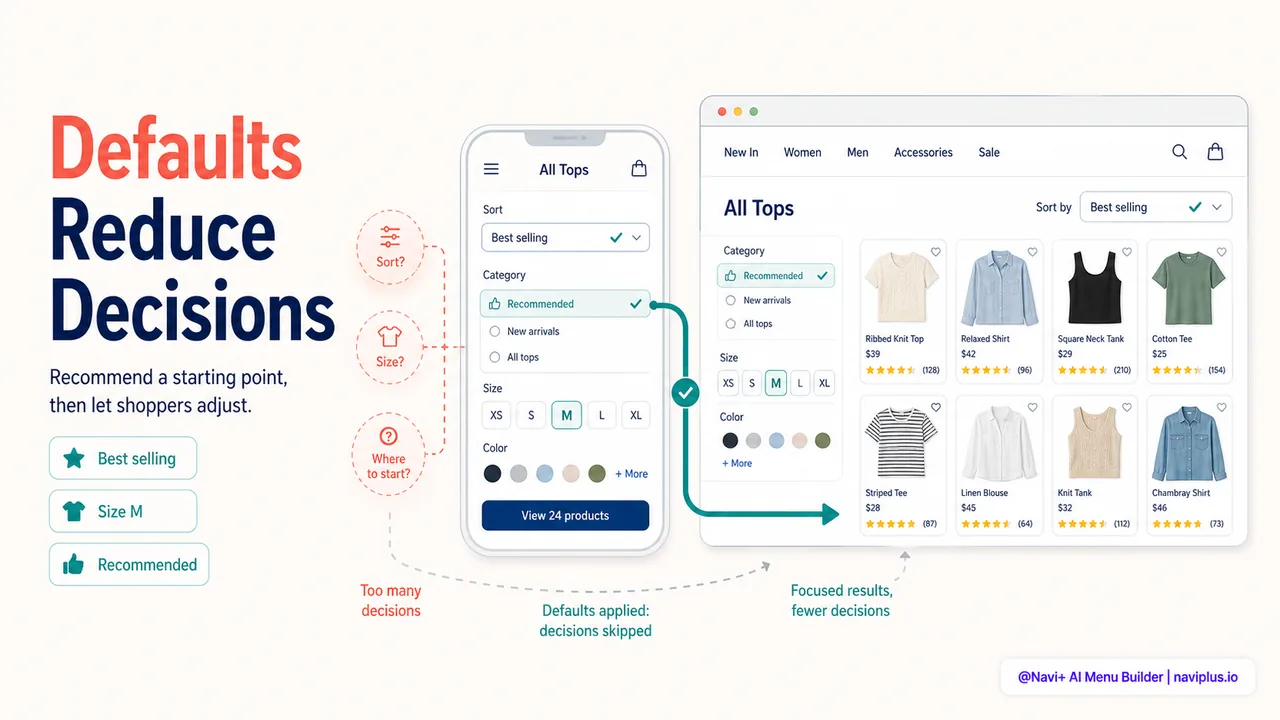
Smart defaults reduce decision fatigue by pre-selecting the most common or most relevant option. The shopper can change it if they want, but most shoppers accept the default and move on.
On a collection page, sorting by “Best selling” or “Recommended” as the default means the shopper doesn’t have to think about sort order — the store has already chosen a sensible one. If they want to sort by price or newest, the option is there, but the default removes one decision from the shopping flow.
For stores with regional catalogs or sizing systems, smart defaults can preselect the shopper’s region or size based on their location or past purchases. A logged-in customer who previously bought size M doesn’t need to select it again — the store remembers and defaults to it. This is personalization that reduces work, not personalization that feels intrusive.
On mobile, a tabbar with a pre-selected Home button (highlighted to show the shopper where they are) is a small default that reduces confusion. The shopper doesn’t need to figure out which screen they’re on — the visual cue tells them.
The principle is always the same: reduce the number of active decisions the shopper has to make. Each decision avoided is mental energy saved for the decisions that actually matter — like whether to buy the product.
Deep-diveRead the full guide → Smart defaults in navigation and filters
Where to start
Quick auditCount the number of top-level items in your main menu. If it's more than 8–10, ask whether every item needs to be there, or whether some can be grouped under broader categories.
Look at your menu and count the top-level categories. Research suggests 7 plus or minus 2 items — roughly 5 to 9 — is the sweet spot for human working memory. More than that, and the shopper has to work harder to scan and choose.
If your menu has 15 or 20 top-level items, consider grouping them. “Women’s Tops,” “Women’s Bottoms,” and “Women’s Dresses” can become subcategories under “Women’s Clothing.” This reduces the initial decision from 15 options to 8, and the shopper drills down from there.
Look at your collection pages. Do they show 100 products with no default sort or filters? That’s decision overload. Add a sensible default sort (Best selling or Recommended), and make filters prominent so the shopper can narrow the list with one or two clicks.
Finally, consider adding one or two intent-based categories if your catalog supports it. “Gifts Under $50,” “New Arrivals,” “Best Sellers” — these aren’t product categories, but they’re decision shortcuts. The shopper who clicks “Gifts Under $50” has already made two filtering decisions (purpose: gift, price: under $50) in one click. That’s two fewer decisions they have to make manually.
Reducing decision fatigue in navigation isn’t about hiding options. It’s about structuring them so the shopper can find what they want without feeling overwhelmed by everything they don’t.
Explore os temas
Este guia traz links para artigos específicos — aprofunde-se em cada um.