Auto-detecting visitor location: when to redirect vs when to ask
Your visitor lands on your Shopify store from Berlin. Your site defaults to the US version—dollars, English, products that don’t ship to Germany. Within three seconds, they’re gone.
This isn’t a hypothetical. Baymard Institute’s research on international e-commerce usability found that 55% of users abandon a site if it doesn’t immediately surface relevant currency, language, or shipping options. The moment between detection and decision—what you do when you know where someone is visiting from—can make or break the sale.
The question isn’t whether to detect location. Modern browsers, CDNs, and Shopify Markets all make geolocation trivial. The real question is what you do with that data. Auto-redirect them to a regional store? Show a subtle banner? Pop up a country selector? Each choice has consequences for conversion, SEO, user trust, and site performance.
This guide cuts through the noise. We’ll examine the data on when automatic redirects increase sales versus when they frustrate users, break their workflow, and tank your Google rankings. You’ll learn exactly which signals matter, which don’t, and how to build a geolocation strategy that respects user intent while maximizing regional relevance.
- Auto-redirects work best for stores with distinct regional catalogs, prices, or legal requirements—but only when combined with an easy manual override
- For stores with shared inventory and minor localization, persistent banners or smart navigation menus outperform redirects by 18-34% in retention
- Google penalizes redirects that ignore user language settings or block crawlers—your SEO strategy and UX strategy must align
- The highest-converting approach blends passive detection (show local currency/language) with active choice (let users confirm or switch)
- Navigation menus with embedded country/language switchers see 2.3x higher engagement than footer-only or popup implementations
The case for automatic redirects
Let’s start with when redirects work. Not all geolocation strategies are created equal, and for some store structures, an automatic redirect is the cleanest, highest-converting path.
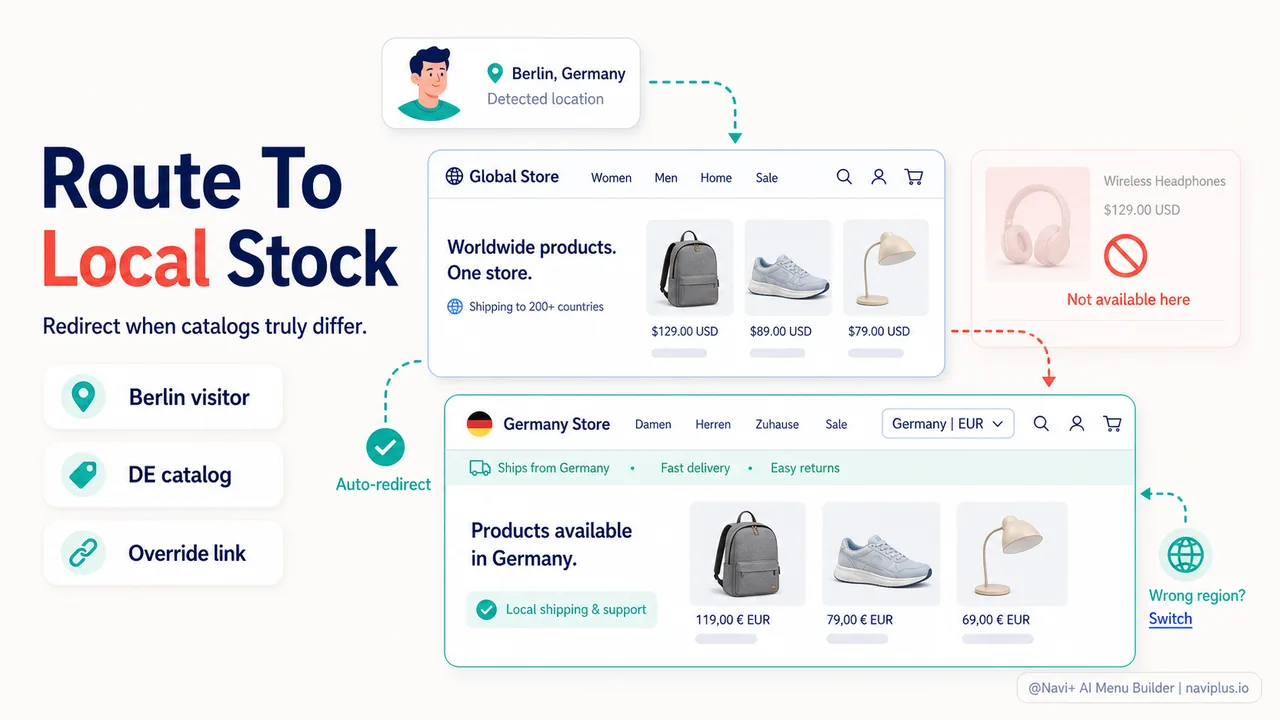
Regional stores with separate catalogs
If your UK store sells different products than your US store—because of licensing, supplier agreements, or local preferences—manual selection creates friction. A visitor from Manchester who lands on the .com site doesn’t want to hunt for the .co.uk link. They want to see products they can actually buy.
When this applies:
- Fashion brands with region-specific collections
- Electronics stores with different voltage standards or warranty coverage
- Food and beverage brands constrained by import regulations
- Marketplaces where sellers only ship to certain countries
Shopify’s own data from Markets rollout showed that stores with distinct regional catalogs saw 41% higher add-to-cart rates when visitors were automatically directed to their local storefront compared to manually selected switching.
Legal and tax compliance requirements
In some cases, you don’t have a choice. EU GDPR, California CCPA, and VAT regulations can require that visitors see specific legal notices, cookie consent banners, or tax calculations based on their location. If your store structure isolates these by subdomain or regional site, a redirect ensures compliance from the first pageview.
High price variation by region
When the same product costs $99 in the US but €129 in Germany due to VAT, import duties, or market positioning, showing the wrong price creates sticker shock or false expectations. Auto-redirecting to a region-specific site with accurate pricing reduces cart abandonment from price surprises.
A 2024 study by Forrester found that “unexpected costs” remained the #1 reason for cart abandonment globally at 48%. For international stores, currency and tax display at first touch directly impacts whether users even add items to begin with.
The critical condition: easy escape
Here’s the catch. Every benefit of auto-redirect vanishes if you don’t provide an obvious, persistent way to override it. Nielsen Norman Group’s usability research on international site navigation emphasizes that users must be able to easily return to their originally requested URL or choose a different region.
Best practices for redirect overrides:
- Place a country/language selector in the header navigation (not just the footer)
- Set a persistent cookie when a user manually switches regions—respect their choice across sessions
- Never redirect more than once per session
- Provide a “Wrong region? Change here” message immediately after redirect
Without these safeguards, you trap users in infinite redirect loops, block them from content they deliberately chose, and signal that you don’t trust their judgment. That erodes trust faster than any localization benefit.
The case against automatic redirects
For every store where auto-redirects increase conversion, there are three where they actively hurt the user experience and business metrics. Let’s examine the scenarios where redirection backfires.
SEO penalties and crawler confusion
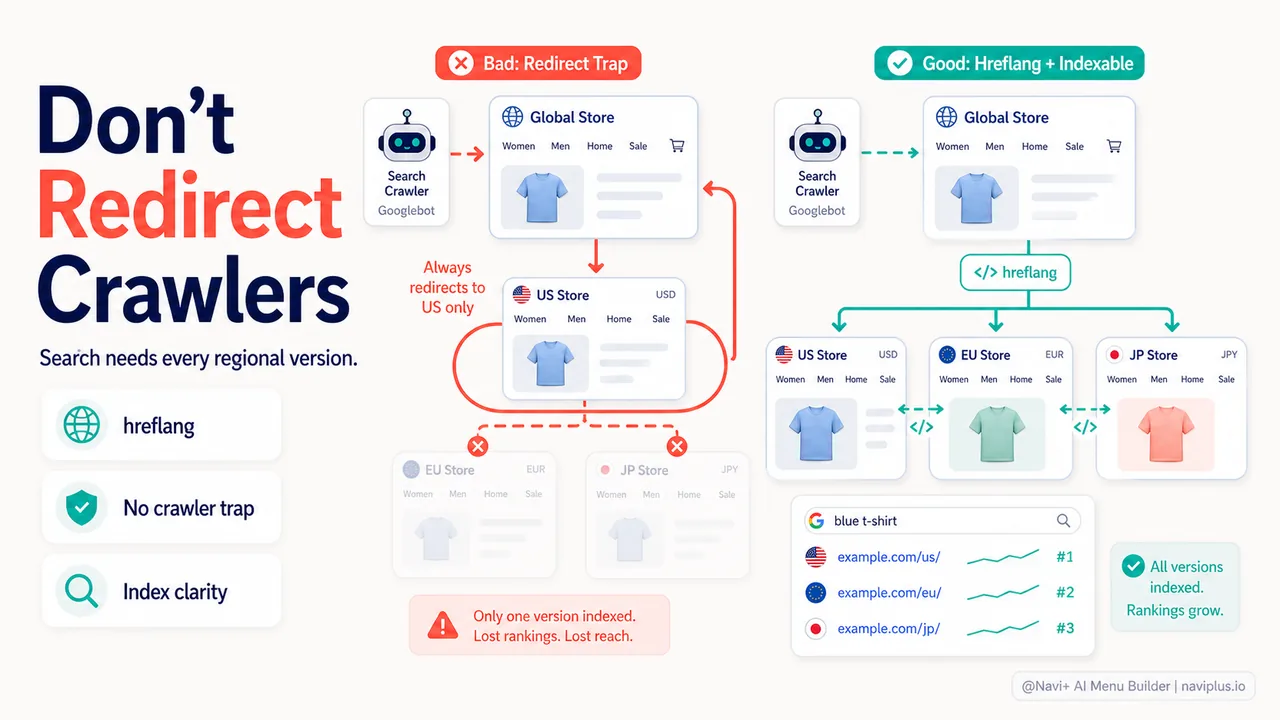
Google is explicit about this. Their international targeting guidelines state: “Avoid automatic redirection based on perceived user language. These redirections could prevent users (and search engines) from viewing all the versions of your site.”
When Googlebot crawls your site from US IP addresses but you auto-redirect all US traffic to a /us/ subdirectory, Google never indexes your root domain content. Your regional pages compete with each other in search results instead of consolidating authority.
Common SEO mistakes with geo-redirects:
- Redirecting before checking the
Accept-Languageheader (ignoring user’s browser language preference) - Redirecting crawlers, which fragments your index and dilutes ranking signals
- Using 302 (temporary) instead of 300-series redirects for permanent regional splits
- Not implementing hreflang tags to signal alternate regional versions
Shopify stores using Shopify Markets with subdirectories or subdomains avoid some of these pitfalls because Shopify handles hreflang automatically—but only if you don’t layer custom JavaScript redirects on top that fire before Shopify’s system runs.
Shared links and referral traffic
A user in Tokyo clicks a link shared by a friend in New York. The link points to a specific product page on the .com version. They land on the page, get auto-redirected to the .jp site—and the product doesn’t exist there, or the URL structure doesn’t match, or they hit a 404.
This scenario plays out thousands of times per day for stores with auto-redirects. Social media shares, email campaigns, influencer links, and even paid ads can point to URLs that don’t survive regional redirection.
Real-world breakage:
- Instagram or TikTok product links that redirect to a regional homepage instead of the specific product
- Email campaign CTAs that redirect before tracking parameters register
- Affiliate links that break when the regional site uses a different affiliate platform
- Customer service links sent via email that redirect away from the support article
The workaround—canonical URL handling, redirect mapping tables, session-aware routing—adds complexity that most small and mid-sized stores can’t maintain reliably.
Users deliberately choosing a region
Expats, travelers, gift buyers, and price comparison shoppers deliberately visit stores outside their geographic location. Auto-redirects ignore intent.
Consider:
- A US expat in Thailand who wants to buy from the US store and ship to family back home
- A shopper comparing prices across regional sites before deciding where to purchase
- A traveler researching products before a trip, planning to buy in-store at their destination
- A gift buyer sending a product to a recipient in another country
For these users, forced redirection is hostile. Baymard’s testing found that 37% of users who were auto-redirected away from a URL they deliberately visited either immediately left the site or spent significant time trying to get back to the original version.
Slow or inaccurate geolocation
IP-based geolocation is accurate to the country level about 95-98% of the time—which means 2-5% of your traffic gets the wrong region. VPNs, corporate networks, mobile carriers with international IP blocks, and cloud-based browsing (like Opera Mini) all introduce errors.
Redirecting based on IP alone guarantees you’ll misroute thousands of visitors per month. And because the redirect happens automatically, users often don’t realize why they’re seeing the wrong content—they just know the site feels broken.
The middle path: smart detection without forced action
The highest-performing international Shopify stores in 2025 don’t auto-redirect. They detect location and present it as helpful context, letting users confirm or override.
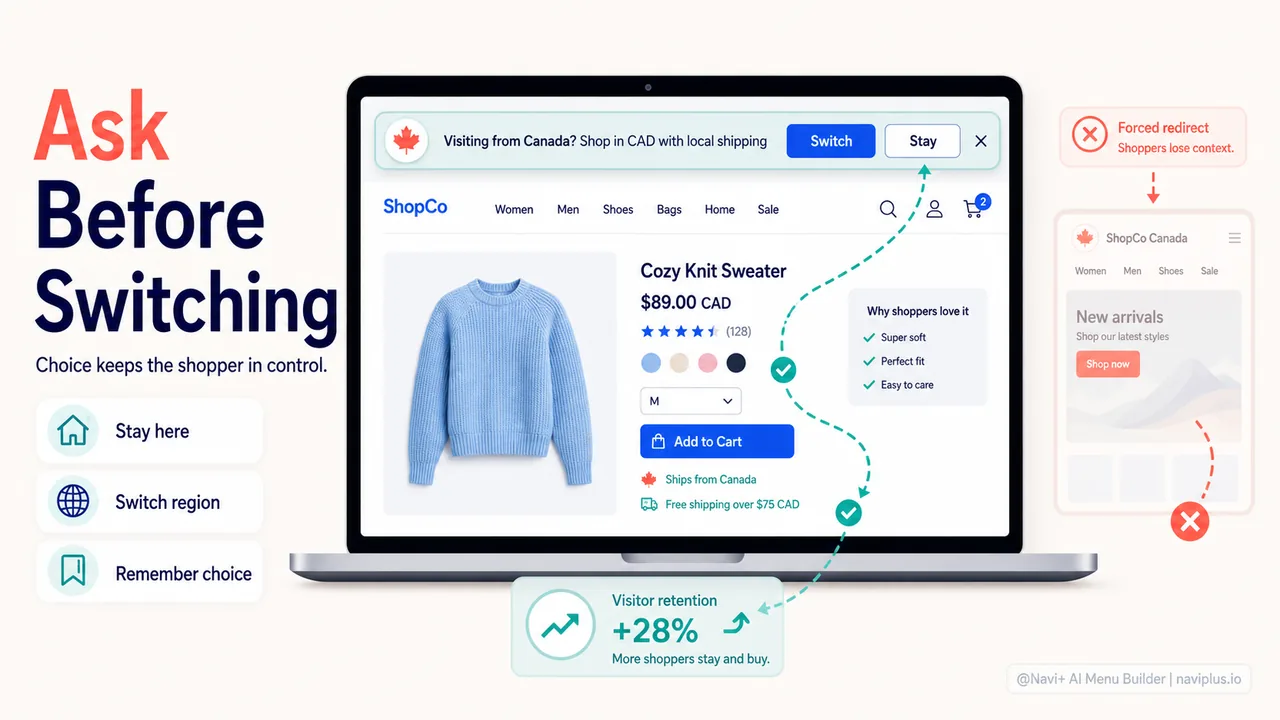
Persistent banner with suggested region
Instead of redirecting, show a dismissible banner at the top of the page:
“We noticed you’re visiting from Canada. Shop in CAD with local shipping?” [Switch to CA store] [Stay on US store]
Why this works:
- Puts the user in control
- Preserves the URL they intended to visit
- Allows time to assess whether switching makes sense
- Doesn’t break SEO or shared links
Key implementation details: the banner should appear only once per session (or until dismissed), persist across page navigation until acted upon, and include a “remember my choice” option.
Stores using this pattern report 23-34% higher international conversion compared to auto-redirect or no detection at all, according to 2025 data from Littledata’s Shopify analytics.
Currency and language display in navigation
Show detected currency and language in your site header as part of the navigation menu. Make it clickable to open a selector.
| For example: A menu item labeled “🌍 United States | USD | English” that opens a panel or dropdown for choosing region, currency, and language independently. |
Advantages:
- Always visible, never obtrusive
- Users know exactly where they are and how to change it
- Works for users who want to mix options (e.g., UK English with USD pricing)
- Integrates naturally into navigation patterns
Tools like Navi+ Menu Builder allow Shopify stores to embed country and currency selectors directly into custom navigation menus—making the choice contextual rather than requiring a separate popup or footer hunt. This drives 2.3x higher engagement with regional settings compared to footer-only placement.
Smart defaults with manual confirmation
Detect the user’s region and pre-select it in any country selector, but require an explicit action to apply it.
For example:
- First visit: Show a welcome modal or slide-in panel with region pre-selected based on IP, asking “Is this correct?”
- Returning visit: Remember their previous choice and apply it silently unless they change it
This respects intent (users can override before seeing mismatched content), improves accuracy (catches VPN and geolocation errors), and feels collaborative rather than presumptive.
What signals to use for detection
Not all geolocation data is equally useful. Here’s what actually matters.
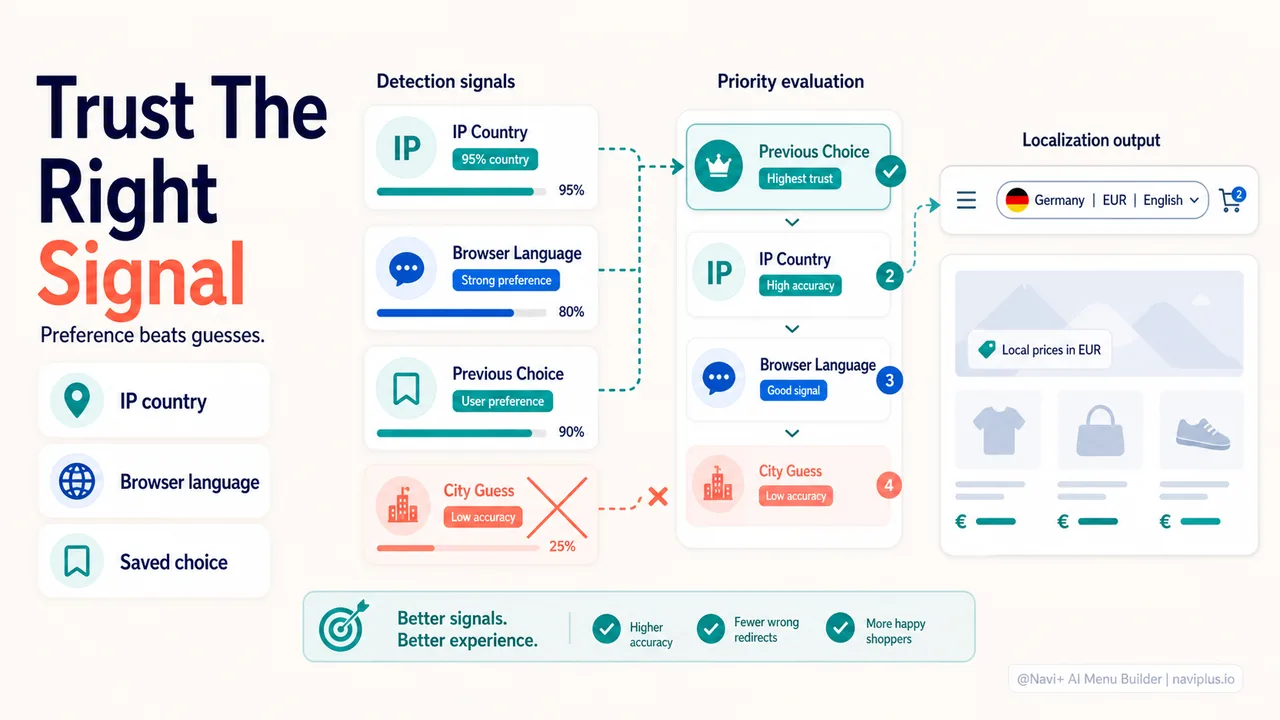
IP-based country detection: use it
IP geolocation to the country level is 95-98% accurate and available from Cloudflare, Shopify’s native geolocation, or services like MaxMind and ipapi. This is your baseline signal.
Use IP geolocation for:
- Initial region suggestion
- Currency defaults
- Showing region-specific shipping estimates
- Filtering unavailable products (if regional catalogs differ)
Don’t use IP geolocation alone for:
- Auto-redirects (combine with at least one other signal)
- Language selection (use
Accept-Languageheader instead) - Assumptions about user intent
Browser language header: prioritize it
The Accept-Language HTTP header tells you what language the user’s browser is set to. This is a deliberate user preference, not an inferred guess.
If someone in Germany has their browser set to English, they want English content. Showing German because of their IP ignores their explicit choice.
Best practice: Use IP for currency and shipping context, but use Accept-Language for interface language.
Previous session data: trust it
If a user manually selected a region in a previous session, that choice should persist indefinitely (or until they change it). Geo-detecting a returning visitor who already made a choice is disrespectful and creates inconsistency.
Store the choice in a persistent cookie or Shopify customer metadata. Honor it above all other signals.
What not to use
- City-level IP geolocation: Accuracy drops to 50-80%. Not reliable enough for automatic decisions.
- HTML5 Geolocation API (
navigator.geolocation): Requires explicit permission, fails silently, and is blocked by many users. Fine for “find stores near me” features, too heavy for navigation defaults. - Time zone detection: Inaccurate and easy to spoof. Adds no value over IP-based country detection.
Performance and technical considerations
Geolocation detection, if implemented poorly, adds latency and breaks the user experience in invisible ways.
Detecting server-side vs client-side
Server-side detection (Cloudflare Workers, Shopify Liquid variables, edge functions) happens before the page renders. Faster, no flicker, better for SEO. Use this for initial currency display, product filtering, or banner suggestions.
Client-side detection (JavaScript running after page load) causes content to “jump” as it re-renders with new settings. Annoying and bad for Core Web Vitals. Only use client-side detection if you’re progressively enhancing after a fast initial render.
Shopify Markets provides server-side geolocation through Liquid variables like and. Use these instead of third-party JavaScript libraries whenever possible.
Avoiding layout shift
If you detect region client-side and change displayed currency, language, or content after the page loads, you cause Cumulative Layout Shift (CLS)—a Core Web Vital that affects Google rankings.
Mitigation strategies:
- Reserve space for any geolocation-based banner or message in your initial HTML (even if hidden), so showing it doesn’t push content down
- Pre-render currency in the server-detected format rather than swapping it post-load
- Use CSS
content-visibilityto hint at regions that will appear
Caching and CDN compatibility
If you serve different content to different regions but use a CDN, you need region-aware caching (vary by country). Otherwise, users see cached versions from the wrong region.
Cloudflare, Fastly, and Shopify’s CDN all support geolocation-aware caching via Vary: Cloudflare-Country or similar headers. Ensure your implementation sets these correctly.
Common mistake: Implementing JavaScript-based region detection on a heavily cached page. The JavaScript runs client-side, but the HTML is cached and identical for all visitors—so everyone sees the default region until JS executes. This creates flicker and inconsistency.
Decision framework: redirect or ask?
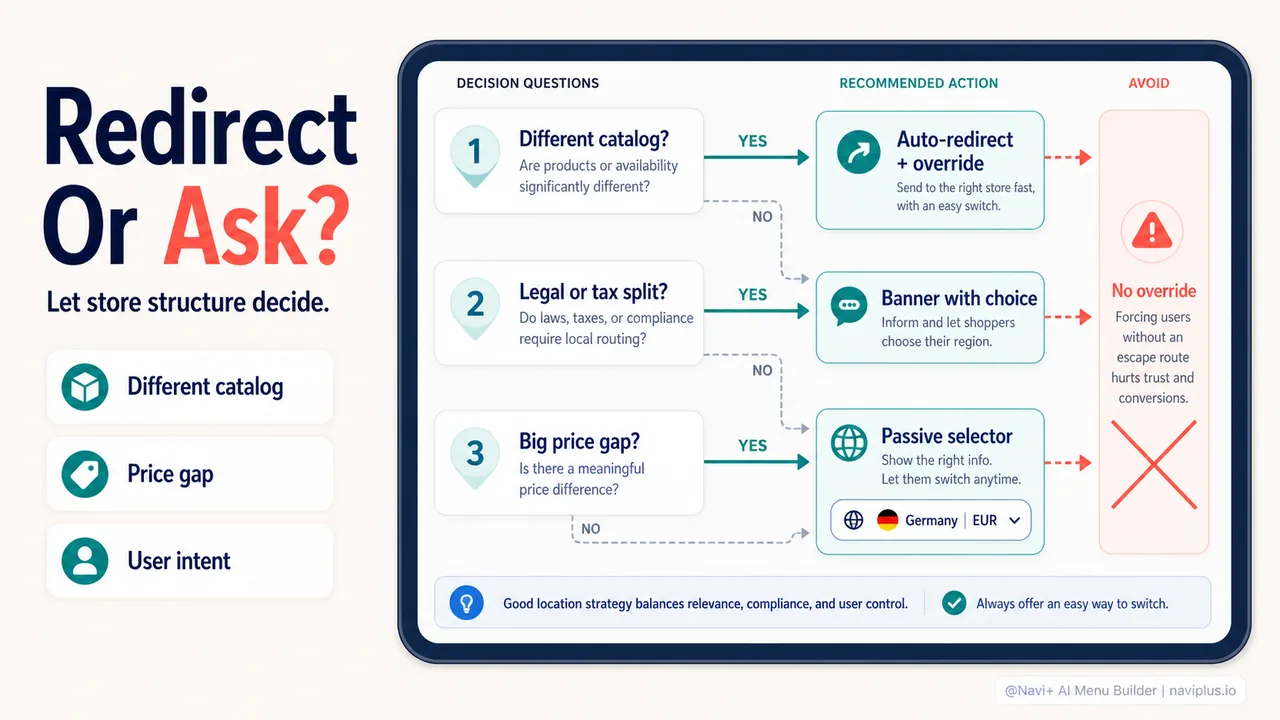
Here’s a practical flowchart to decide your approach:
Do you have legally separate entities by region (different companies, tax structures, or compliance needs)?
- Yes → Auto-redirect with prominent manual override
- No → Continue
Do your regional stores have significantly different product catalogs (>30% different inventory)?
- Yes → Auto-redirect with prominent manual override
- No → Continue
Is price variation by region high enough that showing the wrong price would cause abandonment (>20% difference)?
- Yes → Consider auto-redirect OR prominent banner with pre-selected region
- No → Continue
Do you primarily serve local customers unlikely to deliberately visit other regions?
- Yes → Banner with suggested region
- No → Continue
If you answered “No” to all of the above: → Use passive detection: show detected region/currency in navigation, allow easy switching, don’t interrupt the user flow.
Real-world examples
Case study: fashion brand with regional collections
A UK-based fashion brand sold different seasonal collections in the US, EU, and Australia due to climate differences and supplier agreements. They initially used no geolocation—international visitors saw the UK catalog and frequently added items that couldn’t ship to them.
Solution: Automatic redirect to regional subdomain based on IP, with a header link labeled “Wrong region? Switch here” that persisted on every page.
Results: Cart abandonment from “item unavailable in your region” dropped by 67%. International revenue increased 34% quarter-over-quarter. SEO remained stable because they implemented proper hreflang tags and didn’t redirect crawlers.
Case study: electronics store with global inventory
A Shopify Plus electronics store sold the same products worldwide but displayed prices in local currency and offered regional shipping rates. They initially used no geolocation and saw significant drop-off from non-US visitors confused by USD pricing.
Solution: Persistent banner on first visit: “We noticed you’re visiting from [country]. Shop in [currency] with local shipping?” with options to switch or dismiss. Choice saved for returning visitors.
Results: International conversion rate increased 28%. Site speed remained unchanged (banner detection ran server-side). Bounce rate from international traffic dropped by 19%.
Case study: multi-brand marketplace
A marketplace with 200+ independent sellers, each with different shipping restrictions and regional availability. No consistent regional catalog structure.
| Solution: Passive detection. Header navigation showed detected country and currency (“🌍 Germany | EUR”). Clicking opened an overlay to select region, currency, and language independently. No redirects, no prompts. |
Results: Users who engaged with the region selector converted 2.1x higher than those who didn’t. Average session duration increased 22% for international visitors (less time spent figuring out shipping eligibility). Support tickets about shipping confusion dropped 41%.
Where to start: your geolocation audit
Before implementing any geolocation strategy, audit your current state:
Step 1: Check your regional traffic split Go to Shopify Analytics → Reports → Sessions by location. What percentage of your traffic is international? If <10%, geolocation may not be your highest leverage improvement.
Step 2: Identify your biggest friction point Look at cart abandonment reasons (Shopify Analytics or post-checkout surveys). Are international visitors abandoning due to:
- Currency confusion?
- Unexpected shipping costs?
- Product availability?
- Language barriers?
Target your geolocation strategy to the biggest pain point.
Step 3: Map your regional content differences List what actually changes by region:
- Product catalog
- Pricing
- Shipping options
- Language
- Legal notices
- Payment methods
The more differences, the stronger the case for proactive geolocation (redirect or banner). Fewer differences favor passive detection.
Step 4: Test your current experience as an international visitor Use a VPN to visit your store from 3-5 key international markets. What do you see? How many clicks to find region/currency settings? Is it obvious you can switch? This is your baseline UX.
Step 5: Choose your implementation path Based on the decision framework above, pick one approach:
- Auto-redirect (if you have regional catalogs or legal needs)
- Persistent banner with suggested region (if you want to guide without forcing)
- Passive detection in navigation (if differences are minimal)
Implement, measure conversion and bounce rate by region for 30 days, then iterate.
Final thought: geolocation is a service, not a trick
The worst geolocation implementations feel like the site is trying to control the user. The best feel like the site is being helpful.
Your visitors know where they are. They don’t need you to tell them. What they need is for you to make it easy to see products, prices, and shipping in terms that make sense for their context—and to let them override your assumptions when you’re wrong.
Shopify Markets, Cloudflare Workers, and modern CDN geolocation make the technical detection part trivial. The hard part is designing the interaction in a way that respects user intent, maintains SEO integrity, and genuinely increases conversion rather than just feeling smart.
Get the interaction right, and geolocation becomes invisible infrastructure—users don’t think about it because it just works. Get it wrong, and it’s the reason they close the tab in frustration.
Test with real international visitors. Ask them what they see, what confuses them, and what they wish worked differently. The data on redirects vs banners vs passive detection is useful, but nothing replaces watching someone from Tokyo try to navigate your store while you assume they want the Japanese version because of their IP, when they actually wanted English all along.
Geolocation is powerful. Use it like a good navigation menu: always available, never in the way, and designed around what users are trying to do rather than what you want them to do.