You've spent weeks refining your product descriptions, months building trust through reviews, and countless hours optimizing your checkout flow. Yet 70% of shoppers still abandon their carts before completing a purchase. The usual suspects get the blame: unexpected shipping costs, complicated checkout forms, security concerns. But there's another culprit hiding in plain sight—your navigation.
Most cart abandonment strategies focus on what happens after someone leaves: recovery emails, retargeting ads, exit-intent popups. These tactics treat abandonment as inevitable. What if instead, you could use navigation to prevent it in the first place, and more importantly, to bring hesitant shoppers back when doubt creeps in?
- Navigation influences cart abandonment at three critical moments: before adding to cart, during the cart review, and after initial checkout hesitation
- Strategic navigation elements—sticky access to cart, reassurance links, and comparison shortcuts—can reduce abandonment by 15-25%
- The average shopper visits 3-4 pages after adding to cart but before checking out; navigation either facilitates this research or frustrates it
- Mobile cart abandonment (85%+) is significantly higher than desktop (73%), with navigation accessibility being a primary factor
- Recovery-focused navigation isn't about more links—it's about the right links at the right moments
Why shoppers abandon carts: the navigation angle
The Baymard Institute's checkout usability research identifies 49 reasons for cart abandonment. Shipping costs top the list at 48%, followed by account creation requirements and complicated checkout processes. But dig deeper into the qualitative data, and you'll find navigation patterns underlying many of these reasons.
When a shopper says "I wanted to compare prices" or "I wasn't sure about the return policy," they're describing navigation failures. They needed information but couldn't find it easily. When someone says "I got distracted," it often means they clicked away and couldn't find their way back to the cart.
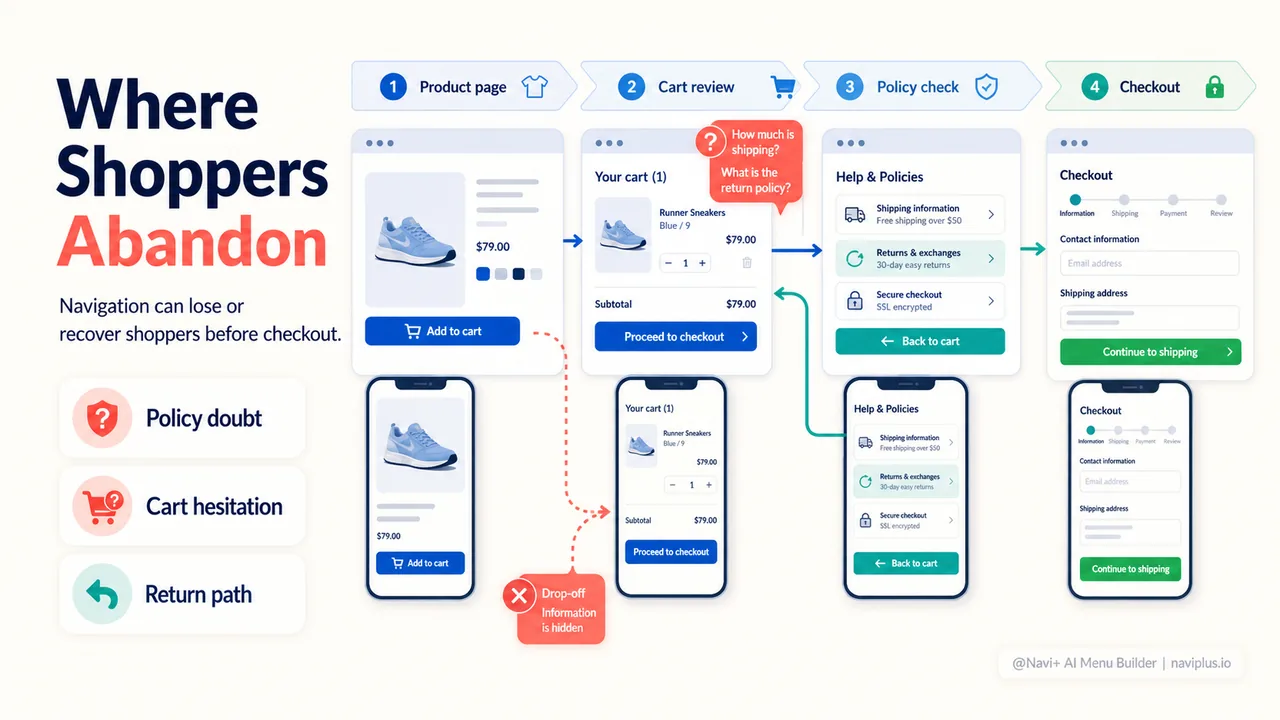
Consider the typical journey: A shopper adds a product to their cart. Good start. But before checking out, they want to verify the return policy. If your navigation doesn't make this information accessible, they have three options: hunt for it (friction), leave to Google it (risk of distraction), or proceed without confidence (setup for post-purchase regret).
This is where navigation becomes a recovery tool, not just a directory.
The three critical navigation moments
Moment 1: Pre-cart confidence building
Before someone adds a product to their cart, they're in research mode. Your navigation during this phase should answer one question: "Do I trust this store enough to start the buying process?"
Strategic navigation elements for this moment:
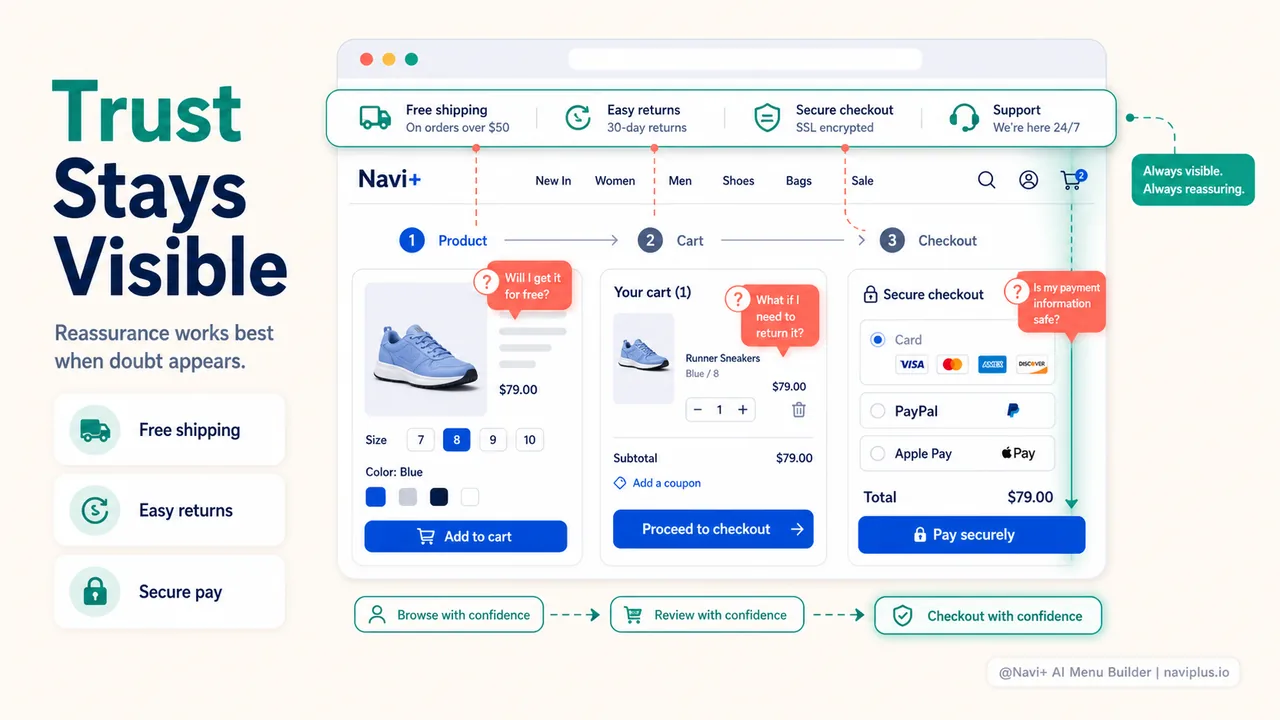
- Persistent trust signals: A sticky menu that keeps shipping information, return policies, and customer service links visible as shoppers browse builds confidence without interrupting the shopping flow
- Category breadcrumbs: Clear paths back to category pages let shoppers compare options without using the browser back button (which often breaks the session state)
- Quick access to social proof: Navigation that surfaces reviews, testimonials, or "popular products" helps hesitant shoppers validate their choice
The goal isn't to add more navigation items—it's to ensure the confidence-building information is never more than one click away.
Moment 2: Cart review and hesitation
This is the most dangerous phase. The shopper has committed enough to add items, but not enough to enter payment details. Research from the Baymard Institute shows that 26% of shoppers abandon because they were "just browsing" or "not ready to buy." Translation: something in the cart review phase failed to move them forward.
Your navigation here serves a different purpose than on product pages. It's not about exploration—it's about reassurance and elimination of doubt.
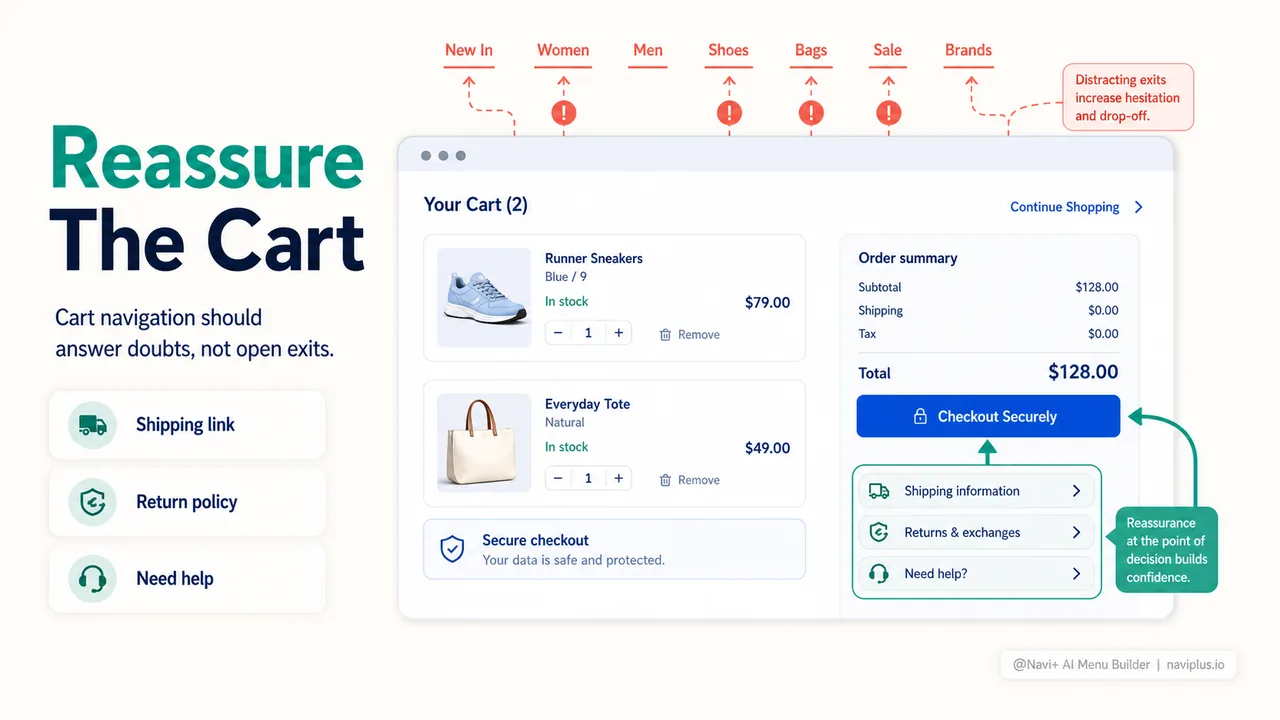
Effective cart-phase navigation includes:
- Direct links to shipping and return policies: Not buried in the footer, but contextualized near the checkout button where doubt surfaces
- Live chat or support access: A navigation element that says "Questions? We're here" can catch shoppers before they navigate away to find answers
- Related products—carefully: Amazon perfected "frequently bought together" for a reason, but generic "you might also like" links often become distraction exits
- Saved cart indicator: A subtle navigation element showing "Your cart is saved" reduces the psychological pressure to complete immediately
What you should NOT include in cart-phase navigation: links to top-level categories, promotional banners for different products, or anything that suggests "keep shopping" when the shopper is on the edge of converting.
Moment 3: Checkout hesitation and return paths
A shopper clicks "Checkout," sees the form, and feels overwhelmed. Or they realize they want to add one more item. Or they remembered a question about sizing. This is the moment where navigation becomes a recovery lifeline.
The standard navigation mistake: disappearing entirely. Many Shopify themes strip away navigation during checkout, treating it as a distraction. But checkout hesitation is real—Google's research shows that 69% of mobile shoppers abandon checkout forms specifically, not the cart.
Smart checkout-phase navigation:
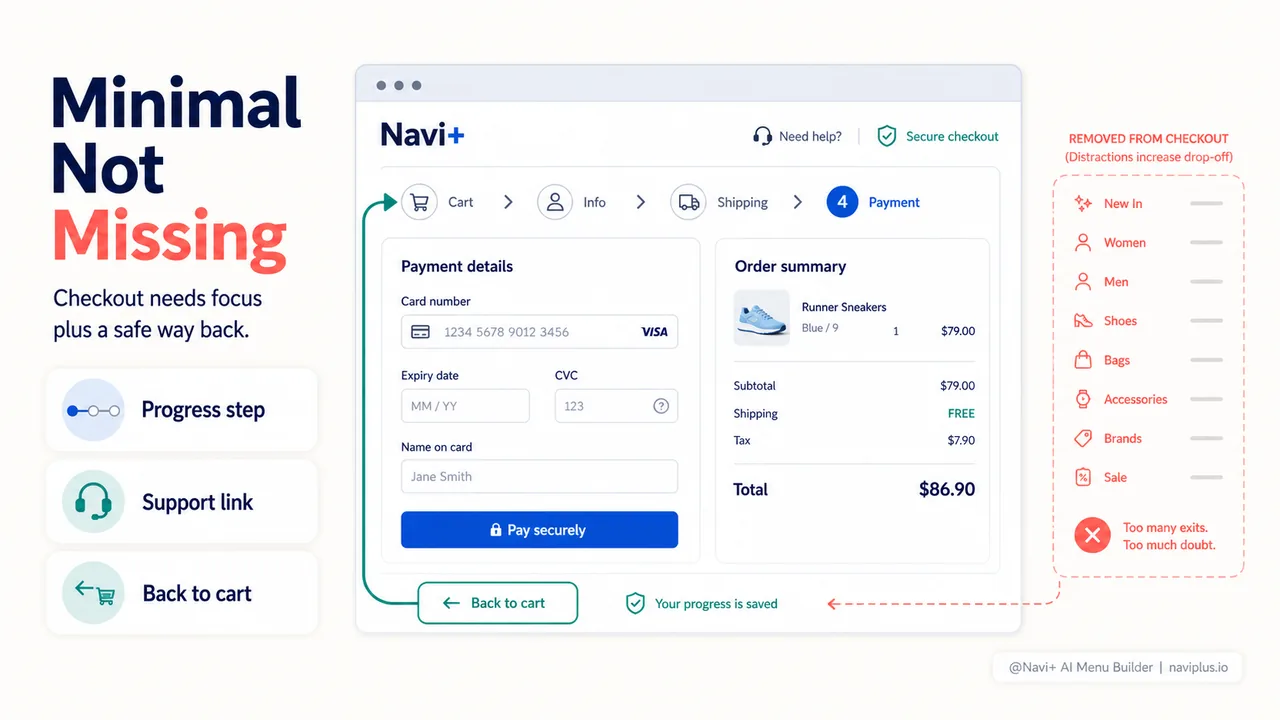
- Persistent cart access: A sticky cart icon that shows item count and lets shoppers review without losing checkout progress
- Minimal header: Not full navigation, but key trust elements—security badges, customer service contact, maybe a help link
- Clear "back to cart" option: Sounds obvious, but many checkouts make it hard to return to the cart without abandoning progress
- Progress indicator: Technically navigation—it shows where they are in the process and reduces the "how long will this take?" anxiety that triggers abandonment
Mobile cart recovery: navigation gets critical
Mobile cart abandonment rates exceed 85%—significantly higher than desktop's 73%. Navigation plays an outsized role in this gap.
The problem: mobile screen space is limited, so navigation gets hidden behind hamburger menus. When a mobile shopper wants to verify shipping costs or check a return policy, they have to collapse the current view, open the menu, hunt for the right link, read the information, and then find their way back to the cart.
Each of these steps is a potential abandonment point.
Mobile-specific navigation strategies for cart recovery
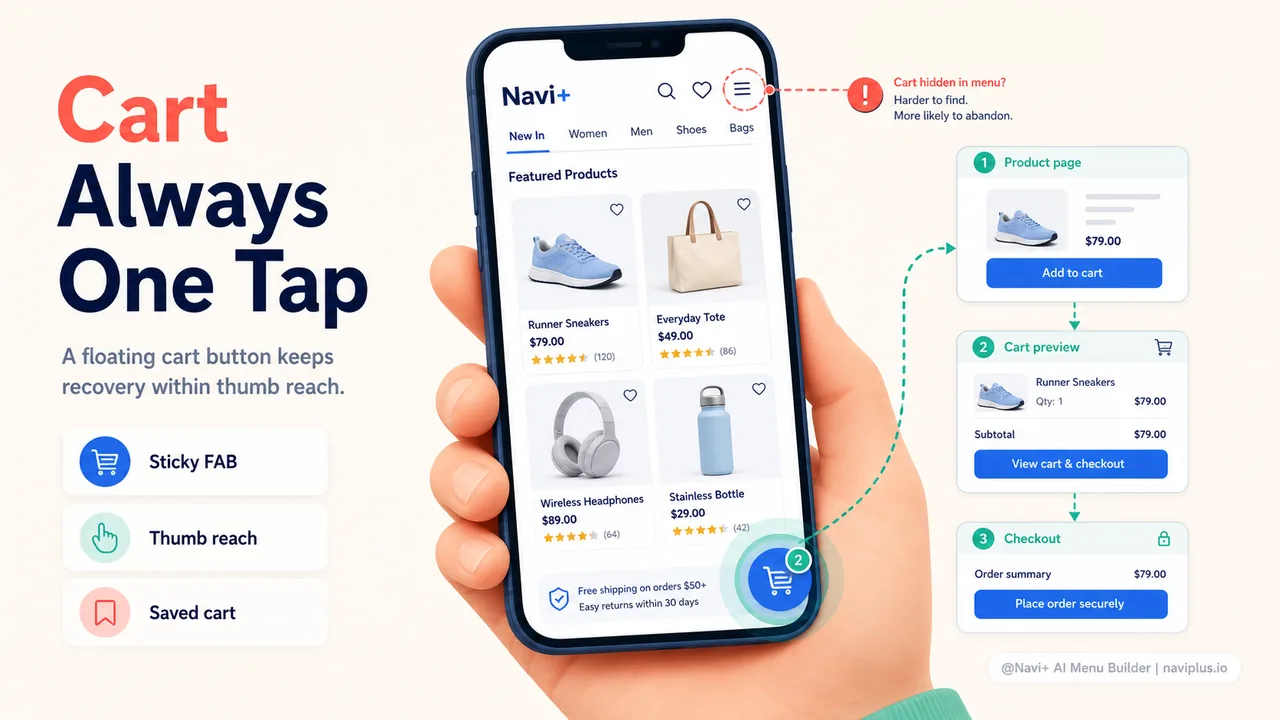
Sticky floating action buttons (FABs): A persistent cart button that floats above content as shoppers scroll keeps cart access immediate. When implemented well, FABs can reduce mobile cart abandonment by 15-20% according to mobile usability studies.
Contextual quick links: Instead of full navigation, provide context-aware links. On product pages: "Shipping & Returns" right below the price. On cart pages: "Need help?" above the checkout button.
Cart preview on tap: Rather than navigating to a full cart page, a slide-in preview lets shoppers see their cart status without losing their place. This is particularly effective when implemented as part of a sticky mobile menu solution like Navi+ provides—shoppers can check their cart from anywhere without navigation friction.
One-tap return to shopping: After adding to cart, mobile shoppers often want to continue browsing. A clear "Continue Shopping" link that returns them to the exact category or collection they were viewing maintains the shopping momentum.
Recovery navigation in action: specific implementations
Theory is useful, but let's get tactical. Here are specific navigation patterns that reduce cart abandonment:
The reassurance footer
Most cart pages have a footer stuffed with every link from your main navigation. Instead, create a cart-specific footer with only high-confidence information:
- Shipping: speed and cost transparency
- Returns: clear, simple policy
- Security: payment badges and guarantees
- Support: live chat, phone, or email with response time
Test this: A/B test a streamlined cart footer against your standard footer. Watch for changes in checkout initiation rate.
The comparison shortcut
Many shoppers add an item to their cart then want to compare it with alternatives. If your navigation doesn't facilitate this, they'll use the back button—and often get lost or distracted.
Implementation: On the cart page, for each item, include a small "Compare similar" link that opens a quick-view modal or slide-out panel with 2-3 similar products. This lets shoppers satisfy their comparison impulse without leaving the cart context.
The incomplete cart reminder
When a logged-in shopper leaves with items in their cart, your navigation can become a recovery tool. On their next visit, the cart icon in your navigation should show their saved item count. More advanced: a subtle banner on the homepage saying "You have 2 items waiting in your cart" with a direct link.
This works because it removes the navigation friction of remembering and finding the cart. The shopper doesn't have to think "where did I leave off?"—you're showing them.
The trust-signal sticky bar
A thin, persistent bar at the top of your site that rotates between key trust signals (free shipping, easy returns, secure checkout, support availability) keeps reassurance visible without cluttering the main navigation.
On cart and checkout pages, this bar can become more specific: "Questions? Click here to chat" or "Your cart is automatically saved."
What not to do: navigation patterns that increase abandonment
Just as important as what to include is what to avoid:
Removing all navigation at checkout: This "funnel focus" approach backfires when shoppers have last-minute questions. They can't find answers, so they leave to Google them—and often don't return.
Generic "related products" on cart pages: Unless your recommendations are truly relevant (based on actual purchase data, not just the same category), these become distraction exits rather than upsell opportunities.
Hidden cart on mobile: If your cart icon is buried three clicks deep in a mobile hamburger menu, you're creating abandonment friction. The cart should never be more than one tap away.
Promotional navigation in checkout: Banner ads for sales, popups for email signup, anything that suggests "stop what you're doing and look at this" during checkout is abandonment fuel.
Complex mega menus on mobile: If opening your mobile navigation requires shoppers to load and scroll through dozens of links just to find "Shipping Info," you're adding cognitive load at precisely the moment you should be reducing it.
Measuring navigation's impact on cart recovery
You can't improve what you don't measure. Here's how to track whether your navigation changes actually reduce abandonment:
Key metrics to watch
| Metric | What it tells you | How to track |
|---|---|---|
| Cart-to-checkout rate | Percentage of shoppers who view cart and then initiate checkout | Shopify Analytics > Online Store Conversion Rate |
| Checkout abandonment rate | Shoppers who start checkout but don't complete | Shopify Analytics > Checkout Behavior |
| Average cart page time | How long shoppers spend reviewing their cart | Google Analytics > Behavior > Site Content |
| Navigation clicks from cart | Which links shoppers use while in cart/checkout | Google Analytics > Events (requires setup) |
| Mobile vs desktop abandonment gap | Platform-specific friction points | Compare abandonment by device type |
A/B testing navigation changes
When testing navigation changes for cart recovery, test one element at a time. Examples:
- Test A: Standard navigation vs. cart-optimized navigation (streamlined links, added reassurance)
- Test B: Hidden mobile cart vs. persistent floating cart button
- Test C: Generic footer vs. reassurance-focused footer on cart page
Run each test for at least two weeks or until statistical significance. Watch not just for changes in abandonment rate, but also for unintended consequences (did the change reduce exploration and hurt average order value?).
The psychology behind recovery navigation
Why does navigation design affect abandonment so powerfully? It comes down to cognitive load and perceived control.
When shoppers can't easily find information they need, cognitive load spikes. The brain interprets difficulty as risk. "If I can't easily find their return policy, what else are they hiding?" This is particularly true during the high-stakes moment of entering payment information.
Navigation that keeps trust signals and support access visible reduces this cognitive load. It signals transparency: "We're not hiding anything. Here's how shipping works. Here's how to contact us. Here's our return policy."
Perceived control matters too. Research from the Nielsen Norman Group shows that users feel more confident completing tasks when they can see clear navigation paths—even if they don't use them. A persistent cart icon isn't just functional; it's psychological reassurance that "I can always go back and check."
Where to start: your cart recovery navigation audit
Ready to reduce abandonment through better navigation? Start with this 20-minute audit:
Step 1: Test your own checkout flow (5 minutes)
On both desktop and mobile:
- Add a product to cart
- From the cart page, try to find your shipping policy without leaving the cart
- Try to find your return policy
- Try to access customer support
- Start checkout, then try to go back to the cart
- From any product page, try to view your cart
Note: How many clicks did each task take? Was any information impossible to find?
Step 2: Check your analytics (10 minutes)
In Shopify Analytics or Google Analytics, answer:
- What's your cart-to-checkout rate? (Benchmark: 50-60% is typical)
- What's your checkout abandonment rate? (Benchmark: 70-75%)
- What's the gap between mobile and desktop abandonment? (If mobile is 10%+ higher, navigation is likely a factor)
- Which pages do shoppers visit after viewing their cart? (This reveals the information they're seeking)
Step 3: Identify your highest-friction point (5 minutes)
Based on your test and analytics, where do most shoppers abandon? Common patterns:
- High cart-page time but low checkout initiation: Shoppers are hesitating on the cart page, likely seeking reassurance
- High mobile abandonment: Cart access or information-finding is too difficult on small screens
- Visits to shipping/return pages from cart: This information needs to be surfaced in navigation near the checkout button
Quick wins to implement this week
Based on common friction points, here are fast implementations with high impact:
If mobile abandonment is 10%+ higher than desktop: Add a floating cart button that stays visible as shoppers scroll. Most menu builders, including tools like Navi+, can implement this in under 10 minutes without code.
If shoppers visit your policies from the cart: Add a small "Shipping & Returns" link directly on the cart page, above the checkout button. Even better: use a modal or accordion to show key policy points without navigation away from cart.
If checkout form abandonment is high: Ensure your checkout phase includes minimal but reassuring navigation—security badge, support link, and clear cart access. Test removing promotional elements from checkout pages entirely.
If repeat visitors don't return to their cart: Make your cart indicator more prominent in your main navigation, especially on mobile. Show item count even when the menu is collapsed.
Final thought: navigation as a conversation
The best cart recovery navigation doesn't feel like navigation at all—it feels like the store anticipating questions and providing answers before they're asked.
Every shopper who abandons a cart is, in some way, saying "I need more information" or "I'm not confident enough yet." Your navigation should be the mechanism that provides that information and builds that confidence, at exactly the moments when doubt creeps in.
This isn't about adding more links or creating more complex menus. It's about strategic simplicity: the right information, accessible at the right moments, without friction. When a shopper is reviewing their cart and wonders "how fast will this ship?"—that answer should be one click away, not buried three levels deep in a footer.
Start with your biggest friction point. Test one change. Measure the impact. Then iterate. Cart abandonment is never going to reach zero, but with navigation designed for recovery rather than just browsing, you can significantly reduce how many shoppers leave—and significantly increase how many come back.