Your menu isn’t just a list of links. It’s the first place visitors see whether your store understands them—and whether they belong.
A customer lands on your Shopify store. In the first three seconds, they’re scanning for signals: Is this place trustworthy? Do they carry what I need? Does this feel like a store for me? Your navigation menu answers these questions before a single word is read. When your menu reflects your brand—visually, structurally, and tonally—it doesn’t just help people find products. It makes them feel like they’re in the right place.
Yet most stores treat navigation as an afterthought. They use the default Shopify menu, match it loosely to their theme colors, and call it done. The result: a generic navigation experience that neither reinforces brand identity nor guides visitors toward conversion. Meanwhile, brands with strong, cohesive navigation see measurably better performance. According to research on visual consistency in ecommerce, brands maintaining consistent visual identity can boost revenue by 10-20%.
This article explores how to make your menu an active expression of your brand—one that builds trust, reduces friction, and ultimately drives more sales.
- Your navigation menu is a brand touchpoint, not just a utility—visitors form trust judgments in seconds based on visual and structural cues.
- Brand-aligned menus improve conversion by reducing cognitive load and signaling professionalism.
- Five key areas where brand identity shows up: visual consistency, tone/labels, structure, interaction style, and mobile experience.
- Practical tactics include matching typography and color systems, writing labels in your brand voice, and designing navigation hierarchy that mirrors your customer journey.
- Even small changes—like adjusting icon style or label phrasing—compound into a cohesive brand experience.
Why your menu is a brand moment
Every element on your site either strengthens or weakens brand perception. Your logo, product photography, and copy all work together to build identity. Navigation sits at the center of this system—it’s present on every page, interacted with repeatedly, and often the first UI element a visitor touches.
Research from Baymard Institute shows that homepage and category navigation directly impacts how users perceive an ecommerce site’s organization and trustworthiness. When navigation feels generic or disconnected from the brand, it creates friction. Visitors unconsciously register the inconsistency: “This menu looks like every other Shopify store, but the product photos feel premium. Something’s off.”
Conversely, when navigation mirrors brand identity—through color, typography, interaction patterns, and structure—it compounds the effect of other brand elements. A luxury skincare brand with a minimal, elegant menu reinforces its premium positioning. A vintage apparel store with playful, illustrated icons signals personality before a single product is clicked.
This isn’t about decoration. It’s about alignment. Design elements influence conversion rates measurably, with UX improvements linked to conversion lifts as high as 400%. Navigation that feels native to your brand reduces cognitive load, builds trust faster, and makes the entire shopping experience feel intentional.
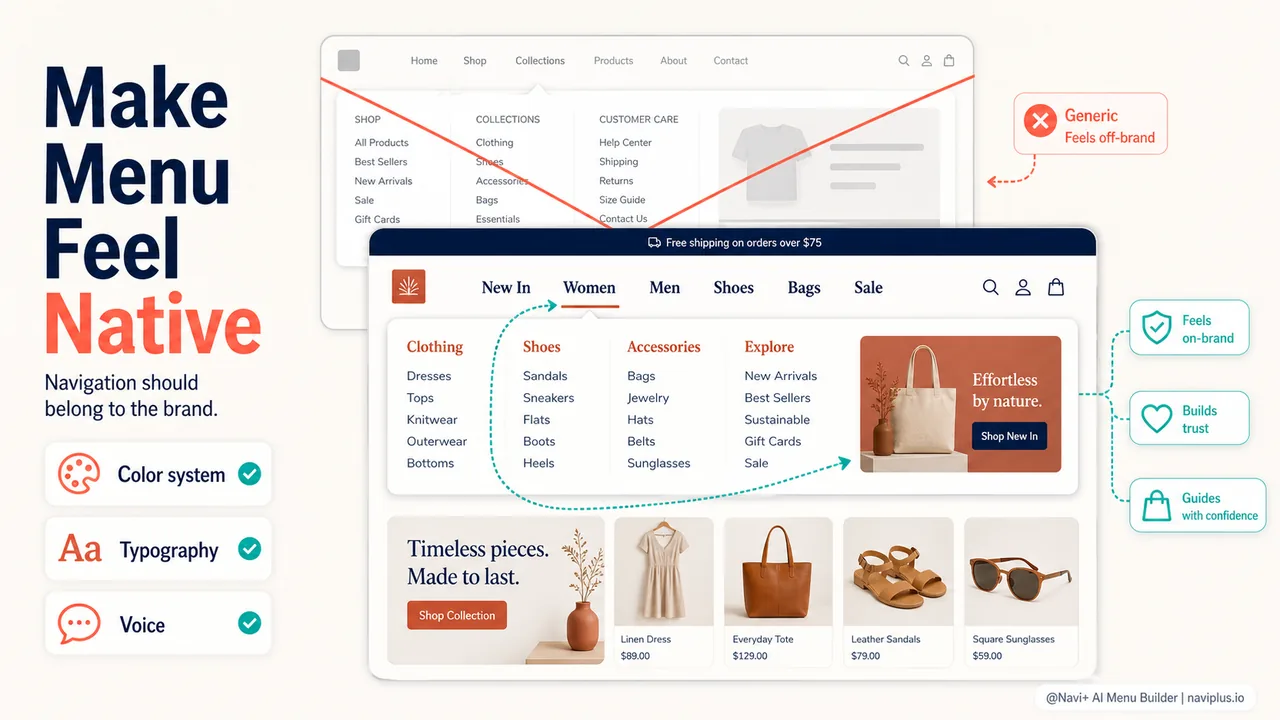
Five places brand identity shows up in menus
Brand-aligned navigation isn’t about redesigning from scratch. It’s about making intentional choices in five specific areas.
1. Visual consistency: color, typography, spacing
Your menu should look like it was designed with your site, not dropped onto it.
Color systems. If your brand uses a specific palette—say, deep navy and warm terracotta—those colors should appear in your navigation. Background colors, active states, hover effects, and dividers all offer opportunities to reinforce visual identity. Avoid the trap of using theme defaults that clash with your brand’s established palette.
Typography. Font choice matters more than most store owners realize. A serif font signals tradition and formality. A geometric sans-serif suggests modernity and precision. A rounded sans-serif feels friendly and approachable. If your product pages use a specific typeface, your menu labels should use it too—or a complementary one from the same type family.
Spacing and scale. Does your brand favor open, airy layouts or dense, information-rich ones? This should be reflected in menu item padding, icon size, and overall whitespace. A minimalist furniture brand needs breathing room in its navigation. A hobby shop selling hundreds of SKUs can pack more density without feeling cluttered.
2. Tone and label style
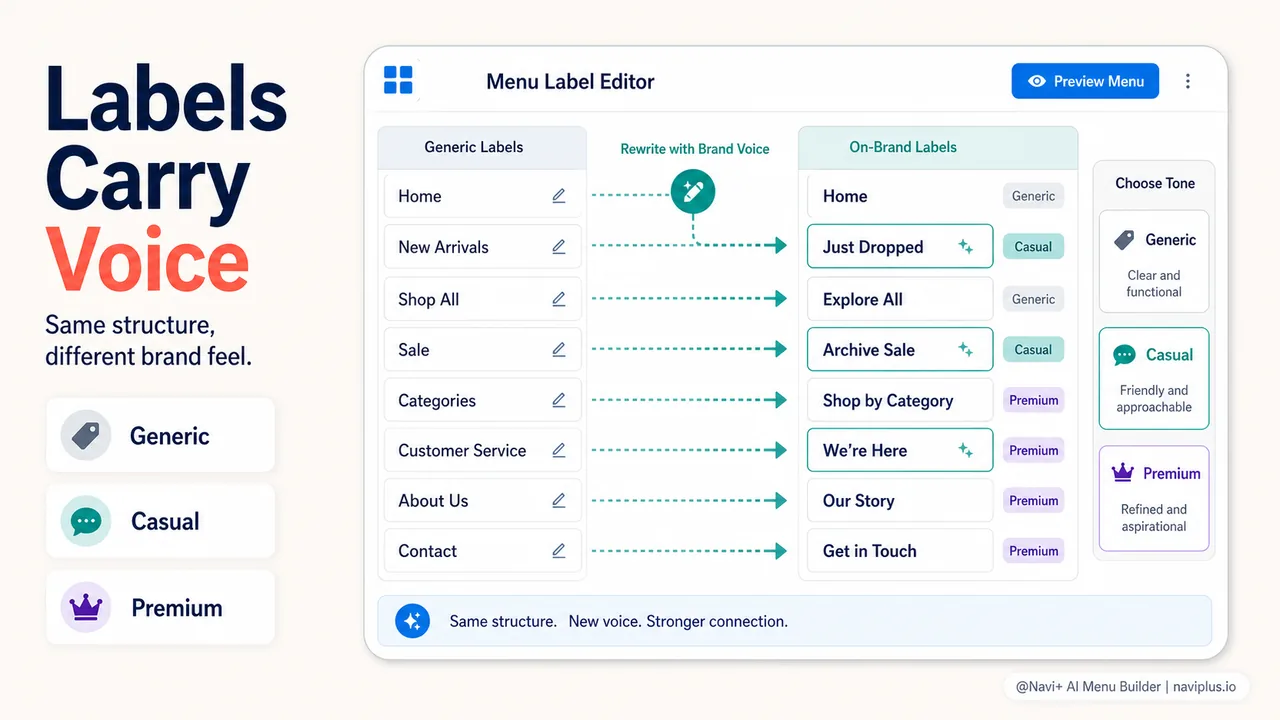
The words in your menu are brand voice in action.
Compare two clothing stores:
- Generic: “Women’s Tops,” “Men’s Bottoms,” “Sale Items”
- Brand-aligned (casual, playful): “Her Closet,” “His Essentials,” “Steals & Deals”
- Brand-aligned (premium, direct): “Women,” “Men,” “Archive Sale”
All three communicate the same structure. But the language sets tone. If your product descriptions are witty and conversational, your menu labels should match that energy. If your brand is clinical and expert-focused (think technical gear or medical supplies), navigation should be precise and jargon-appropriate.
Nielsen Norman Group’s menu design guidelines emphasize clarity and scannability, but clarity doesn’t mean boring. It means choosing labels that your audience recognizes and resonates with.
A few tactical questions:
- Do you use contractions or full words?
- Do you call it “About Us” or “Our Story”?
- Are categories product-focused (“Dresses”) or outcome-focused (“Workwear”)?
- Do you say “Support” or “Help” or “Get in Touch”?
These micro-decisions add up to a voice that either feels like your brand or feels like a template.
3. Structure and hierarchy
How you organize categories reflects how you understand your customer.
A store selling outdoor gear might organize by activity (Hiking, Climbing, Camping) or by product type (Footwear, Apparel, Gear). The choice depends on how customers think. If your audience shops by use case—”I’m planning a backpacking trip”—organize by activity. If they know exactly what they need—”I need a new rain jacket”—organize by product.
Brand identity influences this decision. A brand positioning itself as a lifestyle curator will favor activity-based or outcome-based navigation (“Weekend Getaways,” “Urban Commute”). A brand emphasizing product expertise will favor taxonomy-based navigation (“Technical Shells,” “Insulated Jackets”).
Hierarchy also signals priorities. What appears in the top-level menu? What’s nested in a dropdown? What’s linked in the footer but not the header? Baymard’s research on information architecture shows that logical organization reduces cognitive effort and improves findability. But “logical” is context-dependent. Organize around how your customers shop, informed by analytics and customer interviews.
4. Interaction style
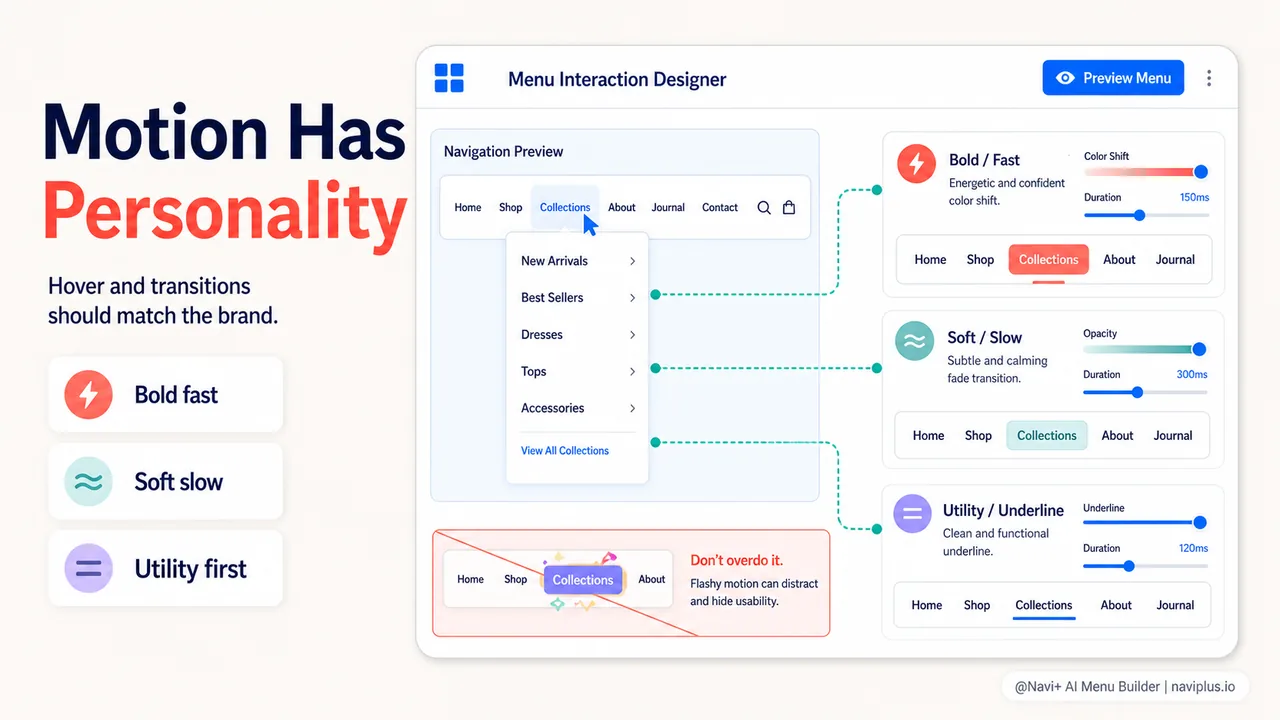
Hover effects, animations, and menu behavior contribute to brand feel.
- Speed: Fast, snappy transitions feel modern and efficient. Slow, eased animations feel luxurious and considered.
- Movement: Does a mega menu slide in from the side, fade in softly, or drop down with a bounce? Each conveys different personality.
- Visual feedback: When a user hovers over a link, what happens? A subtle underline? A background color shift? An icon animation? These micro-interactions should match your brand’s energy level.
A high-energy athletic brand might use bold color shifts and quick animations. A heritage brand selling handmade goods might use subtle, understated transitions. There’s no universal right answer—only alignment with the rest of your brand experience.
One caution: interaction style should never sacrifice usability. Nielsen Norman Group warns that hidden navigation, like hamburger menus, can hurt discoverability and engagement metrics. Brand personality should enhance, not obscure, core navigation functionality.
5. Mobile navigation experience
Mobile is where brand identity is hardest to maintain—and most important.
On desktop, you have space to express brand through layout, typography, and imagery. On mobile, you’re constrained to a small screen where every pixel counts. Yet mobile navigation patterns must still balance brand expression with usability.
A few ways to maintain brand identity on mobile:
Custom icons. Instead of generic hamburger icons or shopping cart symbols, use icon styles that match your brand. Rounded vs. sharp corners, outlined vs. filled shapes, illustrated vs. geometric—these choices carry meaning.
Color blocking. When navigation expands on mobile, does it use your brand’s primary color as a background? Or does it default to white/gray? A full-screen menu is an opportunity to immerse users in your brand palette.
Typography hierarchy. Even in a constrained vertical menu, you can use font size, weight, and spacing to create hierarchy that feels aligned with your desktop experience.
Transition style. Does your mobile menu slide in from the left, expand from the top, or fade in as an overlay? The animation style should match your brand’s interaction language.
Mobile is not a separate brand experience—it’s the same brand in a different form factor. The core identity should be unmistakable, even if the execution adapts to screen size.
Practical tactics for aligning menu and brand
Theory is useful; tactics are actionable. Here’s how to apply these principles to your Shopify store.
Audit your current navigation
Start by taking screenshots of your menu—desktop and mobile, default state and expanded/hover state. Place these next to screenshots of your product pages, homepage hero, and any brand guidelines you have. Ask:
- Do the colors match?
- Does the typography feel cohesive?
- Do the menu labels sound like your brand voice?
- Does the structure reflect how your customers think?
- Do interactions (hover, click, transitions) match the energy level of the rest of your site?
If you spot inconsistencies, list them. Prioritize the most glaring disconnects.
Match your design system
If you have a design system or brand guidelines, your menu should follow them. This includes:
- Color palette: Use your brand’s primary, secondary, and accent colors for backgrounds, borders, hover states, and active states.
- Typography: Use the same font families and weights as your body copy and headings. Match line height and letter spacing if possible.
- Iconography: If your site uses a specific icon style (outlined, filled, duotone), apply it consistently in navigation.
- Spacing scale: If your design system defines spacing increments (8px, 16px, 24px), use them for menu padding and margins.
If you don’t have formal brand guidelines, create a lightweight style reference. Document the 3-5 colors you use most, the 1-2 fonts, and the general “feel” you’re aiming for (modern, vintage, playful, serious). Use this as a north star when styling your menu.
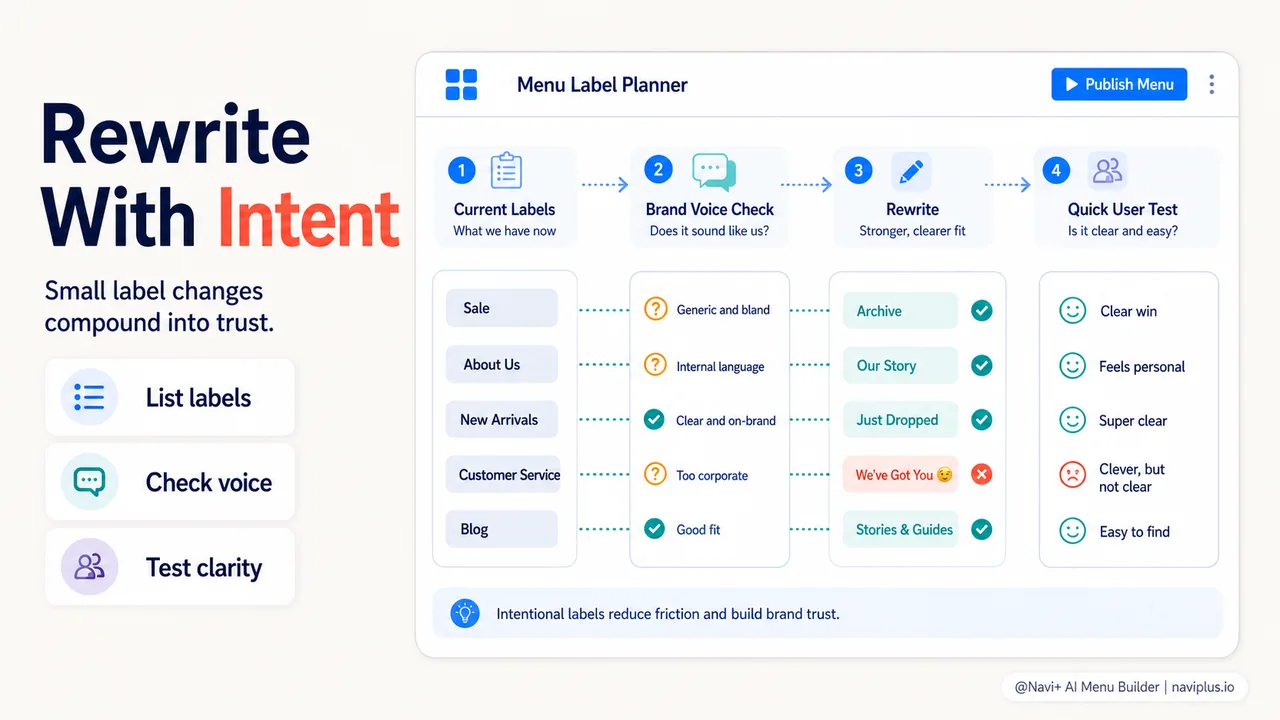
Rewrite labels in your brand voice
Go through every menu label and ask: “Would my brand say it this way?” If not, rewrite.
A few examples:
| Generic Label | Brand-Aligned Alternative (casual brand) | Brand-Aligned Alternative (premium brand) |
|---|---|---|
| New Arrivals | Just Dropped | Latest Collection |
| Sale | Deals | Archive |
| Customer Service | We’re Here to Help | Support |
| About Us | Our Story | About |
| Women’s Shoes | Her Shoes | Women |
Don’t overthink it. The goal is consistency, not cleverness. If your brand is straightforward and functional, straightforward labels are perfect. The key is that they match your voice everywhere else.
Organize around customer intent
Restructure your menu based on how customers actually shop. Use these methods to gather insight:
- Analytics: Look at top landing pages, internal search queries, and navigation click patterns. What are people looking for first?
- Customer interviews: Ask 5-10 recent customers how they navigated your site. What did they expect to find in the menu?
- Card sorting: List all your product categories on index cards (physical or digital). Ask a few customers to group them in ways that make sense. Look for patterns.
Once you understand customer intent, map it to your menu structure. If most visitors search for “gifts,” consider a top-level “Gifts” category even if it’s not a product type. If customers shop by occasion (“Wedding Guest Outfits,” “Weekend Getaways”), organize that way.
Brand identity informs how you label and style these categories, but customer intent defines what categories exist.
Customize interaction details
If you’re using a tool like Navi+ Menu Builder or working with a developer, specify interaction behaviors that match your brand:
- Hover effects: Define the color, underline style, or icon animation that happens on hover. Make it consistent with hover effects elsewhere on your site.
- Menu open/close transitions: Choose animation speed and easing that matches your brand energy. Fast (200ms) feels snappy, slow (600ms) feels considered.
- Active state styling: How do you indicate the current page in the menu? Bold text? Underline? Background color? It should be obvious but not jarring.
Document these choices in a simple style guide so future updates maintain consistency.
Test on real devices
Design looks different on a real phone than in a browser’s responsive mode. Test your menu on:
- iPhone (multiple sizes if possible)
- Android phone
- Tablet (both orientations)
- Desktop at different zoom levels
Check that:
- Colors render correctly
- Typography is readable
- Touch targets are large enough (minimum 44x44px per iOS guidelines)
- Animations feel smooth
- Brand identity is still recognizable on the smallest screen
If something feels off, adjust. Brand consistency isn’t cosmetic—it directly impacts user confidence and conversion.
Common mistakes to avoid
Even well-intentioned efforts to align menu and brand can go wrong. Here are patterns to watch for.
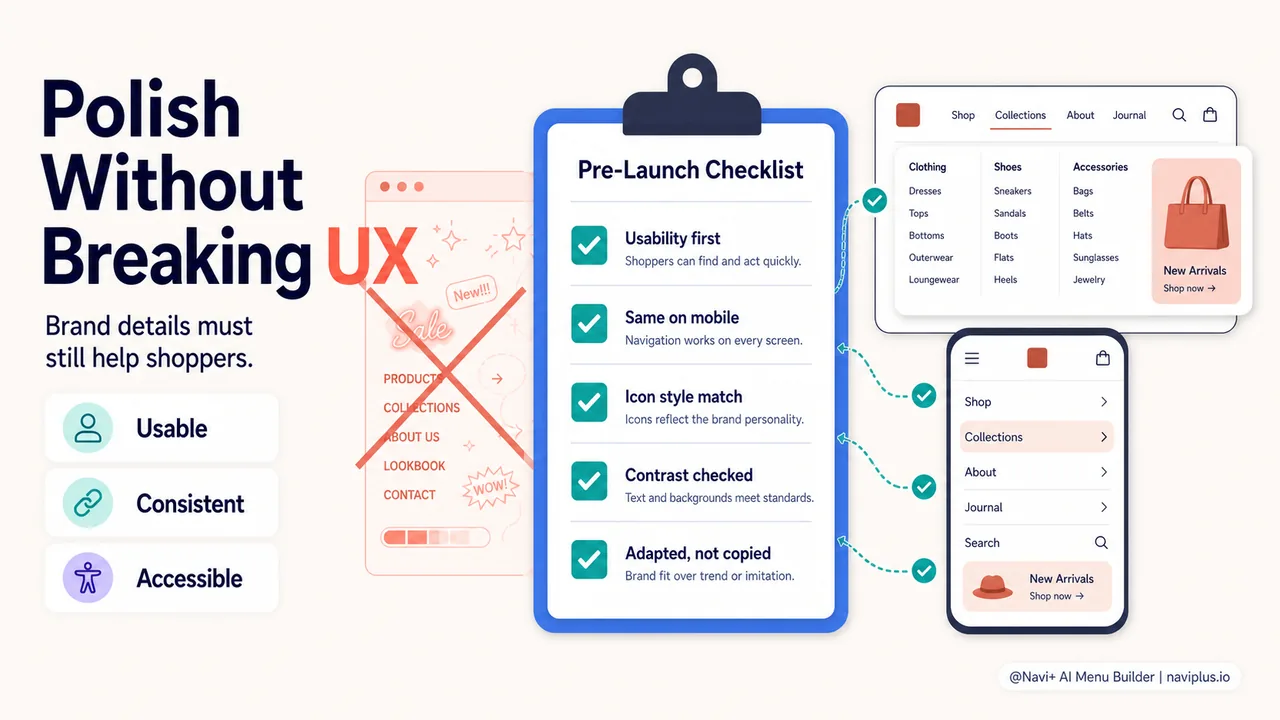
Over-styling at the expense of usability. A menu with animated gradients, custom cursors, and parallax effects might look on-brand, but if it’s slow or confusing, you’ll lose visitors. Prioritize clarity and speed, then layer in brand details.
Inconsistent styling across menu types. If your main navigation looks polished but your mobile hamburger menu is unstyled, you’ve broken the brand experience. Treat mobile navigation with the same design rigor as desktop.
Generic icons with custom branding. You’ve spent time on custom fonts and colors, then dropped in default hamburger and cart icons from a free pack. Icon style is part of your visual language—choose or design icons that match.
Ignoring accessibility. Brand-aligned design must also be accessible. Ensure sufficient color contrast (WCAG AA requires 4.5:1 for body text, 3:1 for large text), readable font sizes, and keyboard navigability. A beautiful menu that excludes users isn’t on-brand—it’s poorly designed.
Copying competitors without adaptation. You see a competitor’s slick mega menu and replicate it. But if their brand is minimal and yours is maximalist, the style won’t translate. Learn from competitors, but filter through your own brand lens.
Real-world examples: what brand-aligned menus look like
While every brand is unique, a few patterns emerge among stores that nail navigation.
Luxury/Premium brands: Minimal mega menus with large product imagery, serif or refined sans-serif typography, generous whitespace, and subtle animations. Navigation is understated but unmistakable. Color palettes lean monochrome or muted. Labels are short and confident (“Women,” “Men,” “House”).
Playful/Lifestyle brands: Illustrated icons, bright accent colors, casual labels (“Shop the Look,” “New Stuff”), and quick, bouncy animations. Mega menus might include lifestyle imagery or bold color blocks. The menu feels like an extension of the brand’s Instagram feed.
Function-First/Outdoors brands: Organized by activity or use case, with clear iconography representing each category. Fonts are readable and robust. Hover states are distinct but not flashy. The menu prioritizes findability—users can get to “Waterproof Hiking Boots” in two clicks without confusion.
Vintage/Heritage brands: Warm color palettes, classic serif or slab fonts, textured backgrounds or subtle borders, and slower, eased transitions. Labels might use old-fashioned phrasing (“Haberdashery,” “Provisions”). The menu feels timeless and curated.
These aren’t templates to copy—they’re demonstrations that brand identity can (and should) permeate navigation design.
The business case: why this matters
If you’re still skeptical that menu design impacts revenue, consider the data.
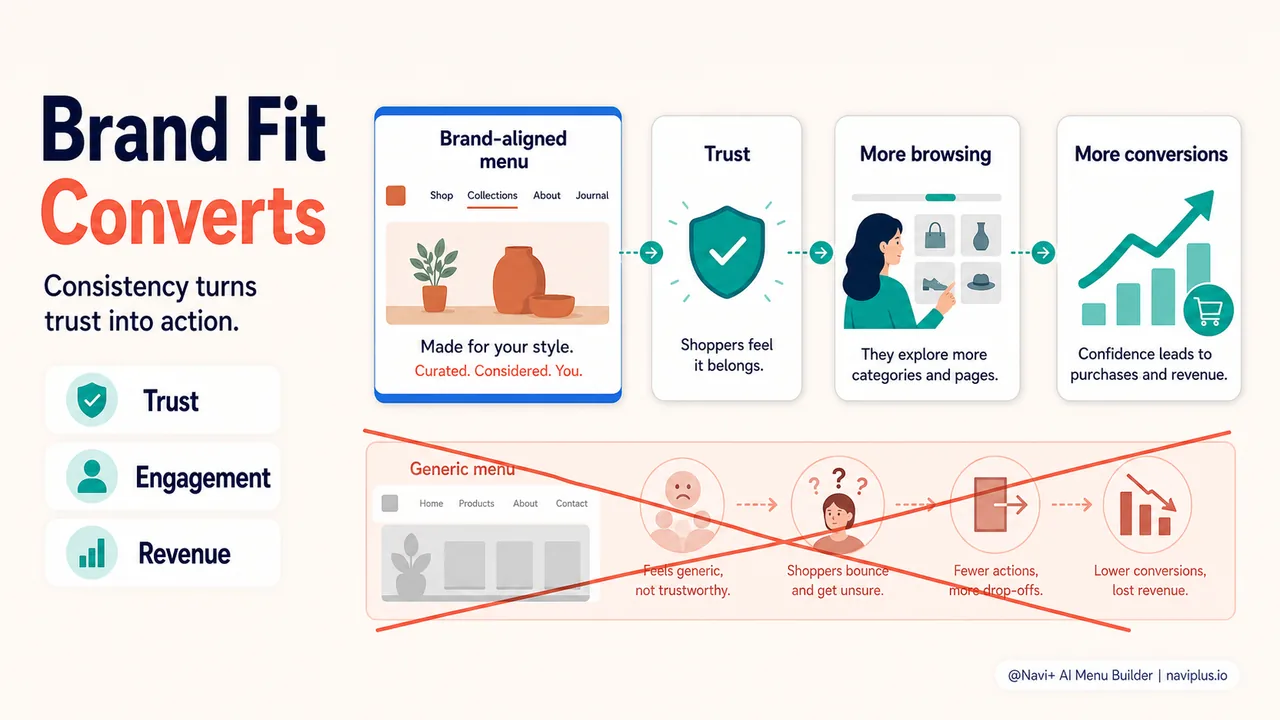
Research on ecommerce conversion optimization shows that navigation is a critical conversion lever. Clear, brand-consistent navigation reduces bounce rates, increases pages per session, and improves add-to-cart rates. When visitors feel confident they’re in the right place, they stay longer and buy more.
Visual consistency—including navigation—can boost revenue by 10-20% according to studies on brand consistency in ecommerce. That’s not trivial. For a store doing $500K annually, a 15% lift is $75K in additional revenue.
And from a cost perspective: aligning your menu with your brand is a one-time design effort that pays dividends on every visit. Unlike paid ads or discounts, which require ongoing spend, a well-designed navigation menu works 24/7 to build trust and guide behavior.
The ROI is clear—but it requires treating navigation as a brand asset, not a utility.
Where to start: a quick navigation brand audit
You don’t need to redesign everything at once. Start with a 15-minute audit.
Step 1: Screenshot your current menu. Capture desktop (default and hover/mega menu states) and mobile (closed and expanded).
Step 2: Place them next to your homepage and a product page. Look at the three screenshots together.
Step 3: Answer these questions:
- Do the colors match across all three?
- Does the typography feel consistent?
- Do the menu labels sound like your product descriptions and homepage copy?
- Does the menu structure reflect how customers describe your products (check reviews and support tickets for language clues)?
- Do hover effects and animations match the energy of the rest of your site?
Step 4: Identify the top 3 disconnects. Write them down.
Step 5: Fix the easiest one this week. Maybe it’s rewriting a few labels, or adjusting menu colors to match your palette, or choosing a new icon style. Small changes compound.
Then tackle the next disconnect. In a month, your menu will feel noticeably more aligned with your brand—and your customers will notice too, even if they can’t articulate why.
Your menu is more than a navigation tool. It’s a brand ambassador, present on every page, shaping first impressions and guiding behavior. When it looks, sounds, and feels like your brand, it doesn’t just help people find products—it makes them feel like they’ve found the right store. That feeling, compounded across thousands of visits, is what turns browsers into buyers and buyers into loyalists.
The effort to align your menu with your brand isn’t cosmetic. It’s strategic. And the stores that get it right don’t just look better—they convert better, too.